In the Recent Activity and Sales Rep Homepages, the Account Requests column has been renamed to "Requests" and will display both account requests and cancellation requests.
Pathway: Recent Activity and Sales Rep Homepages
Recent Activity and Sales Rep (Homepages) - Year Added To Date (16769)
The date format on the Recent Activity and Sales Rep homepages now includes the year.
Pathway: Homepage
Accounts
Customer Service (Account) - Photo in Highlights Section Not Displaying Upon Hover (16968)
Previously, within the Highlights section on the Customer Service screen, images did not display as expected when the user hovered their mouse over the image icon. This has been resolved.
Pathway: Customer Service Screen > Highlights section
To improve keyboard compatibility, minor changes are being made to various screens. These changes include adjustments to fields with drop-down time entry selections and numeric fields that previously used +/- arrows.
In the image example above, the +/- arrows were removed from the Rate field displayed on the Add Active Service screen.
Generate Invoice (Accounts) - Performance Improved to Preview Invoice (16906)
The performance of the Preview Invoice screen has been improved. This update resolves an issue where the amount displayed on the Preview screen differed from the amount generated on the generated invoice if it included a prorated service.
Pathway: Accounts > Search > Accounts
Create Account (Accounts) - Account and Site Custom Properties Moved (17085)
Within the 'Create Account' screen, Account Custom Properties and Site Custom Properties have been relocated to the bottom left of the screen.
Pathway: Accounts > Add Accounts
Add/Edit Account (Accounts) - Broker Group Field Added (17084) [New Feature]
A new Broker Group field has been added to the Add/Edit Account screen. To enable this field, the following setup is required:
In Setup > System > System Options, under the Account tab, 'Require Broker Group For Broker Account Class Type' must be set to "Yes."
In Setup > Account, a new 'Broker Group' setup screen has been added.
In here, users must search for an existing broker account to create the broker group.
In Add/Edit Account, the Account Class selected must be "Broker."
Pathway: Accounts > Search > Accounts
Account Status (Accounts) - Internal/External Collection Status Options Added (17081) [New Feature]
Two new status options, 'Internal Collections' and 'External Collections,' have been added to the Account Status drop down menu. To apply either status, the following requirements must be met:
In Setup > Accounting, a new 'Collection Group / Agency' setup screen has been added to record the specific collection group or agency the account was sent to. Setup here is used in the Edit Account Status History screen.
To apply either status, the account must not have an active service at any site.
Screen changes general users will see include:
In Accounts > Search, 'Internal Collections' and 'External Collections' filter options were added.
In Account Details, if a collection status is applied, the name of the collection group or agency will display in orange between the account's Status and Division fields. In addition, orange coloring was also applied to the details of the account including the calendar days and calendar legend.
In AR Aging Management, the following changes were made:
'External Collections' and 'Internal Collections' have been added to the Account Status drop down filter.
A Collection Group / Agency filter option was added.
The option to bulk update accounts to Internal Collections or External Collections was added.
The option to allow for single updates to 'Internal Collections' or 'External Collections' was added.
Pathway: Accounts > Search > Accounts
Add/Edit Contact (Accounts) - Additional Contact Option for Invoice & Past Due Notifications (17099) [New Feature]
Edit Contact has been updated to include the option to allow a non-billing contact to receive invoice and past-due notifications. For this, the following requirements must be met:
This field only displays IF 'None' is selected for the Billing Contact field AND the contact link type is Account-level (Customer Portal Access tab - Accounts check box is selected).
For the 'Receive Invoice Notifications' option to work, the primary billing contact on the account must have their delivery option set to email. This setting ensures that additional non-billing contacts can also receive invoice notifications via email.
Proposals (Accounts) - Updates to Proposal Pre-Authorization and Support for Terms Addendum and Surcharge Rates (16922, 17060, 17082) [New Feature]
Proposals can now be configured to require either a single pre-authorization or two pre-authorizations before being sent to a customer. Additionally, the Proposal screen has been updated to include settings for Terms Addendum and Surcharge Rates. Below are the setup instructions and requirements for pre-authorizations:
In both scenarios, the Division's Cost/Target Pricing must be defined and the Service Code must have 'Target Pricing (Weight Class)' selected for its Pricing Model. Setup Pathways for both can be found here:
Setup > System > Division
Setup > Services > Service Code
Require 1 Approval
For the system to require a single approval before the proposal can be sent to the customer, the following must be true:
In Setup > Document Formats > Type, the 'Pre-Authorization' field is set to either "Require Authorization for all Documents" OR "Require one Authorization for Documents with a rate below Max. Discount."
Require 2 Approvals
For the system to require two approvals before the proposal can be sent to the customer, the following must be true:
In Setup > Document Formats > Type, the 'Pre-Authorization' field is set to "Require two authorizations for Documents with a rate below Medium Weight Target, Addendum Terms, or a Surcharge Rate Override"
And any two of these are true:
The Service Fees rate entered by the user is less than the medium weight rate.
The proposal includes a Terms Addendum. Term Addendums are created in Setup > Document Formats > Format > Terms Addendums (tab).
The proposal includes a surcharge rate override where the rate is lower than the default rate.
Approval Logic
Pathway: Setup > System > User
The system will identify the approver based on the manager listed in the Manager field of the user who drafted the proposal. If a second approval is required, the system will also require approval from the manager of the first approver, as specified in their user profile.
Two new tabs have been added to the EditCancellation Request screen:
A History tab has been added to track changes to cancellation requests, including updates to the assigned personnel and the current stage of the request.
A Linked Items tab has been added to the screen, enabling users to better manage cancellation requests by associating them with appointments, tasks, and notes.
Pathway: Accounts > Search > Accounts
Accounts - Display Title and Department After User Name - Affects Multiple Screens (17152) [New Feature]
An update has been implemented across multiple screens with user dropdown lists, now showing the user's title and department next to their name.
Account Request (Accounts) - Inactive Request Types Continue to Display for Selection (17196)
Logic has been corrected to request types to restrict what is available to only active types.
Pathway: Accounts > Search > Accounts
Customer Service Screen (Accounts) - Label Update for Wallet/Default Payment Method (17197)
Previously, when the 'Payment Methods' label in the Customer Portal and an account's AR History was updated to 'Wallet', the change unintentionally impacted other areas where the label was used. Any unintended changes have now been corrected.
Pathway: Accounts > Search > Accounts
Transfer Service (Accounts) - Transfer Service Rate/Rate Per Unit Fixed (17203)
Previously, when transferring a service, the Rate and Rate Per Unit were being multiplied together instead of being directly copied, which resulted in incorrect rates for the transferred service. This has been resolved.
Pathway: Accounts > Search > Accounts
WO Add Disposal / Shipment (Accounts) - Fields in Add Disposal / Shipment Record Rearranged (17296)
An issue has been resolved that was causing the Transport Method to clear out when selecting the Facility. In addition, this fix also included the rearrangement of fields in the Add Disposal / Shipment screen.
Pathway: Work Order > Disposal / Ship (tab)
Active Services (Accounts) - Add/Edit Service Frequency Error Message (17268)
In the Add/Edit Active Service screen, if 'Frequency' and 'Days' did not match, the Save button was inactive without an explanation. The logic has been updated to display a message indicating that the Frequency does not align with the number of selected Days. This logic also applies to services added to contracts and proposals.
Pathway: Accounts > Active Services
Refund Requests (Accounts) - Tracking User Who Created Refund (17350)
Enhancements have been made to track the user who created a refund request. This information can be viewed in the History tab of the new Edit Refund Request popup window, accessible by double-clicking the refund request in the Customer Service screen or the Refund Request Management screen within the Accounting module.
Edit Service (Proposals) - Availability of Service Days Selection (17306)
The Edit Service screen has been updated to always display the Service Days selection boxes, except when the frequency is set to on-call.
Pathway: Accounts > Contracts and Proposals
Add Active Service (Accounts) - Only Allow Active Services to Accounts/Sites with an Active Status (17345)
The option to add an active service to a site is restricted if the site's status is:
Inactive
Prospect
Vacant
Exempt
The option to add an active service to an account is restricted if the account's account class is 'Vendor,' or the account's status is:
Inactive
Prospect
Bad Debt
Waste Profile (Accounts) - Update to Add Attachment Option (17357)
In an account's Waste Profile, the 'Add Attachment' popup has been updated to remove the 'Type' selection box.
Pathway: Accounts > Photos, Attachments, Purchase Orders and Waste Profiles
Reversed Invoices (Accounts) Logic Updated to Reminder Emails (17387)
The logic has been updated to exclude reversed invoices from invoice reminder notifications.
Pathway:Accounts > AR History
Search (Accounts) - Logic Updated to 'Account ID' Search Type (17391)
The 'Account ID' search type has been enhanced to support 'contains' searches by allowing the use of a percentage character (%) before the value.
Pathway:Accounts > Search
Anniversary Billing (Accounts) - Logic Updated to 'Anniversary Next Bill Date' Field (17435)
The Anniversary Next Bill Date field now supports date editing. This field will only appear if the account is set to "Anniversary Billing" and cannot be cleared once set.
Pathway: Accounts > Edit Site > Billing Settings
Add Active Service (Accounts) - Default Service Days Based on Nearby Sites (17449) [New Feature]
In Add Active Service, the Service Days selection boxes will default to days based on nearby sites within a 5-mile radius. This logic considers service frequency and line of business, with default selections applied for frequencies of 1x and 2x only.
Pathway:Accounts > Add Active Service
Add/Edit Proposal (Accounts) - Updates to Window Title and Selections in Status Field (17470)
The Add/Edit Proposal window has been updated with the following enhancements:
Renamed to "Add/Edit Document - Proposal" for clarity.
The Status drop down now displays options specific to the selected Document Format.
Pathway: Accounts > Orders, Quotes and Contracts
Active Service (Accounts) - Updates to Add/Edit Service (17469, 17535) [New Feature]
The following enhancements have been applied to the Active Service screen:
Delivery and removal workflow fields are now hidden when 'Company' is not selected for Equipment Ownership, as the company is not responsible for the delivery or removal of equipment it does not own.
Service Days are displayed using single-letter abbreviations, with Sunday abbreviated as 'Su.'
Pathway:Accounts > Active Services
Calendar (Accounts) - Calendar Timestamp to Use Local Time (17445)
The calendar's timestamp has been updated to align with the time zone configured for the division associated with the site.
Pathway:Accounts > Customer Service Screen
Add Account (Accounts) - Update to Surcharge Group for Prospect Accounts (17586)
On the 'Create Account' screen, the Surcharge Group is now visible for the Prospect status and automatically defaults based on the selected Service Region.
Pathway: Accounts > Add Account
Service Record (Accounts) - Display of Site ID (17623)
The Service Record screen now displays the Site ID above the site name. When the service record is accessed from the Inbound/Outbound screen, the Site ID appears as a hyperlink to the Customer Service screen, with a Return option to navigate back to the Inbound/Outbound screen.
Pathway: Accounts > Calendar > (Select) Service Record|Operations > Inbound/Outbound > (Select) Service Record
Active Services (Accounts) - Logic Updates to Site Service Charge Rates with Future Rate Increase (17585)
Previously, in the Active Services section of the Customer Service screen, the current pricing displayed in purple if a future site service charge existed, and the future change not shown. With this update, service charge rates with a future increase display in purple, with the Effective Date and future charge amount.
The logic for the "All" selection in the Division and Assigned To filters on the Account Request Management screen have been updated to display only results for the divisions the user has access to.
Pathway:Accounts > Account Request Management
Photos (Accounts) - Updates to Photos in Accounts (17580)
The following updates and fixes have been applied to the Photos tab in Photos, Attachments, Purchase Orders and Waste Profiles:
The Work Order # column has been renamed to Source and now displays the ID of the source associated with the photo.
A resolved issue now allows photos from account requests to be viewed.
Pathway: Accounts > Photos, Attachments, Purchase Orders and Waste Profiles
Orders, Quotes and Contracts (Accounts) - Logic Updated to Multi-Site Proposals (17581)
The logic for proposals with multiple sites has been updated. Proposals and contracts that include more than one site will now be visible on all associated sites, not just the primary site.
Pathway: Accounts > Orders, Quotes, and Contracts
Service Record (Accounts) - Support for Non-Integrated Credit Card Terminal (17615)
A new "Enabled Non-Integrated Credit Card Terminal" field has been added to the Credit Card/ACH tab in the Division Setup screen. When this field is enabled, the "Credit Card - Non-Integrated Terminal" option becomes available in the Type dropdown on a service record's Add Payment screen. If the field is not enabled, this option remains hidden.
Pathways:
Accounts > select Service Record > Payments (tab) | Operations > Inbound/Outbound > select Service Record > Add Payment | Setup > Division > Credit Card / ACH (tab)
Active Services (Accounts) - Update to Ensure Unique Service IDs (17599)
Service IDs have been updated to ensure uniqueness and prevent duplicates.
Pathway:Customer Service Screen > Active Services
Statement (Accounts) - Due Date Added to Core Statement (17342)
An update was made to the core statement to include a Due Date column.
Active Services (Accounts) - Last Activity Column Added (17668)
The Active Services section of the Customer Service screen now includes a "Last Activity" column, displaying the date of the most recent service marked as 'Completed' or 'Not Serviced'.
Pathway:Accounts > Active Services
Tiered Pricing (Active Services) - Tiered Pricing Cleared if Service Code was Updated in Site Service Rate Update Batch (16757)
Previously, tiered pricing for a service code was cleared during a site service rate update batch if the service code for the site was modified. This issue has been resolved, and tiered pricing will remain visible and unchanged.
Pathway:Sales > Rate Update Batches > Site Service Batch | Customer Service Screen > Active Services > Tiered Pricing icon
Invoice Adjustment (Accounts) - Update to Adjustment Period Drop-Down (17799)
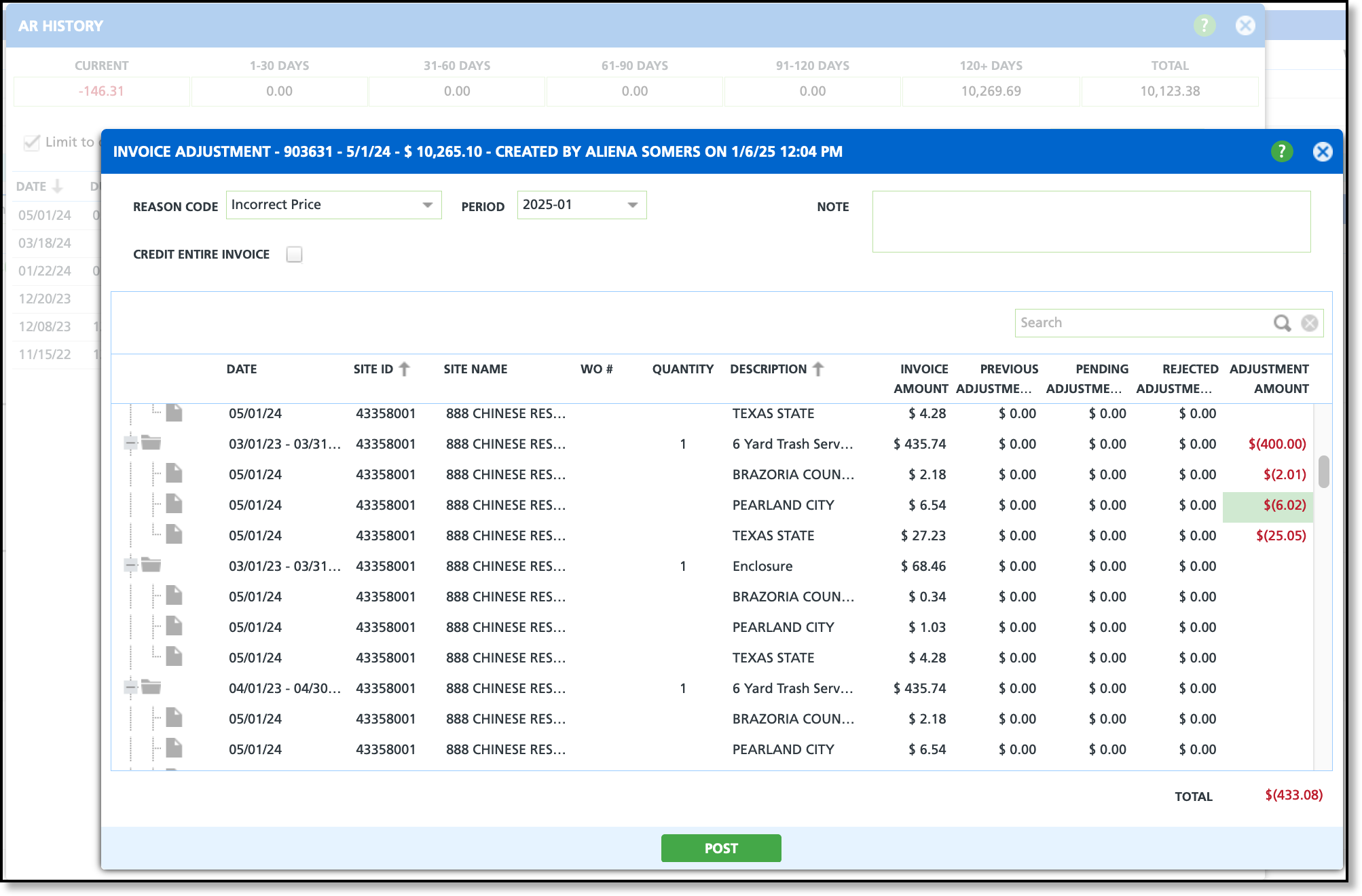
The Period drop down in the Invoice Adjustment screen has been updated to show only the current period and the previous period, provided the previous period remains open.
Pathway: Customer Service screen > AR History > [right-click on] Invoice > [select] View Details / Adjust Invoice
User Activities (Accounts) - Underlined Values to Clearly Identify Details Available (17178)
The User Activity screen has been updated to better highlight activities with associated details. Clicking on an activity will display its details in the lower grid of the screen.
Pathway:Accounts > User Activities
Create On Call Order (Accounts) - Update to Information Displayed on 'Create On Call Order' (16496)
The Create On Call Order pop-up editor has been updated to include the following information:
Site ID, Name and Address
EPA (if one exists)
Terms / Payment Required
Phone number
Contact (account contact, if one exists)
Business Hours - also added to the Edit Service Record pop-up editor
Site Access Note
Site Note
Pathway: Customer Service Screen > Calendar > [right-click] Create On Call Order
Edit Service Record (Accounts) - Duplicated Site Service Charges (17616)
An issue has been resolved that caused service charges to be duplicated on a service record after a rate change was applied to the active service.
Pathway: Customer Service screen > [open] Service Record
Refund / Rebate Check (Accounts) - Updates to Rebate Check Prepayment to Better Support Refund Scenarios (17503)
Enhancements have been made to Customer Service, AR History, Permissions, and other areas to expand rebate check prepayment, providing better support for refund scenarios.
Customer Service Screen
In the Menu dropdown, 'Rebate Check Prepayment' has been renamed to 'Refund / Rebate Check.'
Additionally, permission 174 ('Add Rebate Check Prepayment') has been renamed to 'Add Refund / Rebate Check' and now grants access to the 'Refund / Rebate Check' option in the Customer Service screen's menu.
Add Refund / Rebate Check
The Add Prepayment window has been updated to 'Add Refund / Rebate Check' and the following other enhancements have been applied to the screen:
Account ID is just 'Account'.
Addition of a Reason Code drop down.
Removal of up/down arrows from the Check # and Amount fields.
Logic updated to Amount field to require an entry value greater than '0'.
Post logic has been updated to allow only positive amount values.
Main Menu - Vendor/Rebate Payments
The 'Vendor/Rebate Payments' main menu option and its corresponding screen have been renamed to 'AP Payment Batch.' In addition to this, the following supporting permissions have been renamed:
'View/Add Vendor/Rebate Payments' is now 'View/Add AP Payment Batch'
'Post Vendor/Rebate Payment' is now 'Post AP Payment Batch'
'Void Vendor/Rebate Payment' is now 'Void AP Payment Batch'
AR History
In AR History, 'Rebate Prepayment' has been renamed to 'Rebate/Refund Check.'
Invoices (Accounts>AR History) - Autopay Message Restored to Display on Invoices (17893)
An issue has been resolved that prevented the auto pay message from displaying on printed invoices. Location of the message may vary across invoice formats.
In the Rate Update Batch screen, a 'Created User' field has been added to the 'Created Date' column, and a Net Variance column has also been added.
Pathway: Sales > Rate Update Batches
Rate Update Batch (Sales) - Updates to Voiding a Batch (17608)
Previously, the Reason Code and Net Variance fields were displayed when voiding a batch. With this update, those fields are now hidden, leaving only the Notes field visible.
Pathway:Sales > Rate Update Batch
Rate Update Batch (Sales) - New 'Book of Business' Grid View Added (17763)
A new 'Book of Business' grid view option has been added to both the Service and Service Charge rate update batch types.
An issue has been resolved that prevented charge codes from populating for selection, and the logic has been corrected to prevent a batch from showing 0 records after creation.
Pathway: Sales > Rate Update Batches
Operations
Edit Disposal / Shipment (Operations) - Disposal Tickets Entered in NavuNav Not Displaying In Dispatch Disposal Records (16806)
An issue has been resolved where Disposal Records created in NavuNav were not being calculated into the Disposal Rate field when viewed in Navusoft.
Pathway: Operations > Dispatch
Driver Timeline (Operations/Dispatch) - Modifications Applied to the Driver Timeline Screen (17304) [New Feature]
Review the enhancements made to the Driver Timeline screen in Dispatch, as well as some of the updated views within Dispatch.
Additional Items Added to Menu Options
New selection options include:
Set Driver Log In / Out
Upon selection, the Worker Daily Productivity window opens.
Set Truck Odometer
Upon selection, the Update Truck Odometer window opens.
Add Fuel
Upon selection, the Fuel Record window opens.
Display of Stop Counts
Stop counts have been updated to include the same counts displayed on the Dispatch screen. Similar to the Dispatch screen, clicking the hyperlink for a count will open the Services List.
Route Data
Route data has been relocated to the top of the screen and has been expanded to include:
Downtime
The first value represents the sum of hours and the value in parenthesis represents the number of downtime entries.
Pre-Trip
Displays the Pass/Fail results as a hyperlink to the Vehicle Inspection Results screen.
Post-Trip
Displays the Pass/Fail results as a hyperlink to the Vehicle Inspection Results screen.
Mark Completed/Check In
Mark Completed
Only displays if the route record statuses are 'Scheduled' or 'In Progress.'
When clicked, all associated route record statuses are updated to 'Completed,' and the action button changes to 'Check In.'
Check In
'Check-In' allows dispatchers to mark routes as reviewed, logging their name and a timestamp to confirm thorough examinations and reinforce accountability.
Only displays when all route record statuses are marked 'Completed.'
Upon click, the check-in completion timestamp and user ID are recorded.
Dispatch Screen Changes
Timeline Icons
Color Variations:
Red: Route's status is 'In Progress' or 'Completed' but Log In time is missing and the driver check in timestamp is blank.
Green: Driver check in is completed and timestamp is populated.
Blue: Default color
Orange: Route status is completed but the driver check in timestamp is blank.
Route Data Entry
The Route Productivity view has been renamed to 'Route Data Entry'.
Log In and Log Out
If a route record is missing log-in or log-out times, a '?' link will appear. Clicking the link opens the Worker Daily Productivity screen, allowing for the entry of log-in and log-out times.
Truck (Distance)
In the Route Data Entry view, the 'Truck / Odometer' column has been renamed to 'Truck (Distance),' with the distance displayed in parentheses using the appropriate unit of measure (UOM).
Dispatch (Operations) - 'Line of Business' Label Renamed (17531)
In Dispatch, the Line of Business label has been renamed to 'Route Primary Line of Business.'
Pathway: Operations > Dispatch
Route Management (Operations) - Display of Route Number on Map (17537)
The Route Management map now displays the route number alongside the corresponding day of the week for each stop.
Pathway: Operations > Route Management
Dispatch (Operations) - Edit Route Updates for Disposal Records (15174)
The disposal record has been enhanced with the following features:
Edit Completed Disposal Tickets: The ability to edit a disposal ticket for a route with a completed status.
Reassign Disposal Tickets: The ability to reassign a disposal ticket to a different route, as illustrated in the image below.
Pathway: Operations > Dispatch
Dispatch (Operations) - Updates to Context Menu Actions (17440)
The following enhancements have been applied to the Dispatch screen:
Left and Right-Click Enhancements
Left-click anywhere within a row (that is not a link) and it will cause the selection of the row.
Right-click anywhere within a row and the following logic applies:
If the row is already selected, the context menu is displayed.
If the row is not already selected, all previous selections will be cleared, and only the right-clicked row will remain selected and the Context Menu displayed.
Select All / Deselect All Checkbox Indicator
An indicator will display based on the selection status of the check boxes:
None selected: The box is empty.
Some selected: A dash indicator is shown.
All selected: A check mark is displayed.
Context Menu Updates
If multiple rows are selected, the Context Menu will display the number of selected rows along with the following new menu options:
Inbound tickets were previously not calculating the percentage surcharge for charge codes. This has been resolved.
Pathway: Operations > Inbound/Outbound
Dispatch (Operations) - Site Hyperlink Added to Edit Service Record (17666) [New Feature]
The Site ID hyperlink has been enabled on the Edit Service Record screen from the Dispatch Services list. Clicking the hyperlink opens the site in the Customer Service screen, which will also include a back button to return to the Services List screen.
Services List (Operations) - Checkbox Selection and Context Menu Updates (17363)
The following enhancements have been applied to the Services List screen:
Left and Right-Click Enhancements
Left-click anywhere within a row (that is not a link) and it will cause the selection of the row.
Right-click anywhere within a row and the following logic applies:
If the row is already selected, the context menu is displayed.
If the row is not already selected, all previous selections will be cleared, and only the right-clicked row will remain selected and the Context Menu displayed.
Select All / Deselect All Checkbox Indicator
An indicator will display based on the selection status of the check boxes:
None selected: The box is empty.
Some selected: A dash indicator is shown.
All selected: A check mark is displayed.
Context Menu Updates
If multiple rows are selected, the Context Menu will display the number of selected rows along with the following new menu options:
Display on Map
Send Service Notification
Change Posting Status
Toolbar Updates
The following updates have been made to the toolbar:
The Set Posting button has been removed
The Edit button has been removed
Edit Service Records
The "Edit Service Record" option has been removed from the context menu. Its functions remain accessible through the "Change Route" and "Change Scheduled Date" options. Additionally, a "Reset Sequence to 0" feature has been added to the popup editor for both options.
Disposal Activity (Operations) - Updates to the Activity and Details Screens (15934)
The following updates have been applied to the Activitytab in Disposal Activity, and the Details screen, accessible by clicking on a summary link:
Activity tab updates:
The original 'Group By' drop down option has been renamed to "Summary By."
A new 'Group By' has been added with options:
Disposal Location, Line of Business and Route
Details screen improvements:
If a work order does not exist, the column will display blank. Previously, this displayed a 'null' hyperlink value.
The Total row has been reformatted to enhance the display of column totals.
The weight summary value and its unit of measure are now displayed together in the total column.
Pathway: Operations > Disposal Activity
Inbound/Outbound (Operations) - New Search Type Setting and Logic Update (17935)
A setting to default the Search Type has been added to the Facility Setup screen. When this setting is enabled, the search type value is automatically populated for new transactions. If the setting is not enabled, the search type value remains blank.
Facility Setup - Establish Default Setting
The default setting for the Search Type drop down in the Inbound/Outbound screen is configured in Facility Setup.
Inbound/Outbound - Search Type
If a facility has a default search setting enabled, it will automatically populate when a new transaction is created.
Route Management (Operations) - Export and Import Logic Updated (17856)
In the Route Management Current tab, the Import and Export logic for both format options (Navusoft and RouteSmart) has been updated to use Route ID instead of Route Name. To support this, Route ID was added to the Route Setup screen (Setup > Operations > Route) and the following changes were made to the Navusoft Format and RouteSmart Format:
Services List (Operations) - Infrequent Issue Prevented Display of Stops (18024)
In rare cases, stops did not display when NavuNav provided invalid latitude and longitude values for services marked as completed or with an exception. This issue has been identified and resolved.
Pathway:Operations > Dispatch
Active Dispatch (Operations) - Display of Work Orders with Exceptions (17970)
Screen logic has been updated to display work orders marked with an exception on the left side of the timeline.
Pathway:Operations > Active Dispatch
Accounting
AR Aging Management (Accounting) - Multi-Select Added to Division Filter (17018)
In AR Aging Management, the Division filter was enhanced to support the selection of multiple divisions.
Pathway: Accounting > AR Aging Management
AR Aging Management (Accounting)- Ability To Change Account Status Of Multiple Accounts (16999) [New Feature]
An enhancement has been made to AR Aging Management, adding the option to select multiple accounts when changing account statuses.
Pathway: Accounting > AR Aging Management
AR Payment Batch (Accounting) - Total Counts Updated (17198)
A change has been made to the AR Payment Batch Screen to change the Open, Posted, and Voided count from a batch count to a count of payments.
Pathway: Accounting > AR Payment Batch
AR Payment Batch (Accounting) - Modifications to AR Payment Batch (17209) [New Feature]
The following changes have been implemented in AR Payment Batch:
Payment Source Setup
A new Payment Source Setup screen has been added to Setup > Accounting.
AR Payment Batch
In the payment batch grid (example shown below), the 'Is Merchant' column has been renamed to 'Source'.
Create Payment Batch
The Bank Account field now displays the first 50 characters of the bank account description (if available). Additionally, a new Source field has been added to the popup.
Payment Batch Details
The bank account description will now be displayed after the field when selected, limited to the first 50 characters. A Source filter has also been added to the screen for improved filtering.
AR Payment Batch - Import Popup
The Import popup has been updated to include a Source drop down field.
GL Transaction Processing
When the Type is 'Payment', a "View Details" link will appear, allowing you to open the AR Batch Details upon selection.
An enhancement now supports the 'Every 2 Weeks' billing frequency, automatically creating the next billing cycle batch once the current one is marked 'Completed.'
Pathway: Accounting > Billing
Refund Request Management (Accounting) - New Feature and New Screen Added (17305, 17425, 17499) [New Feature]
A new Refund Request feature has been added to both the Customer Service screen and the Accounting module. Details about this feature, including setup, are outlined below.
New Permissions
Pathway:Setup > System > Permission
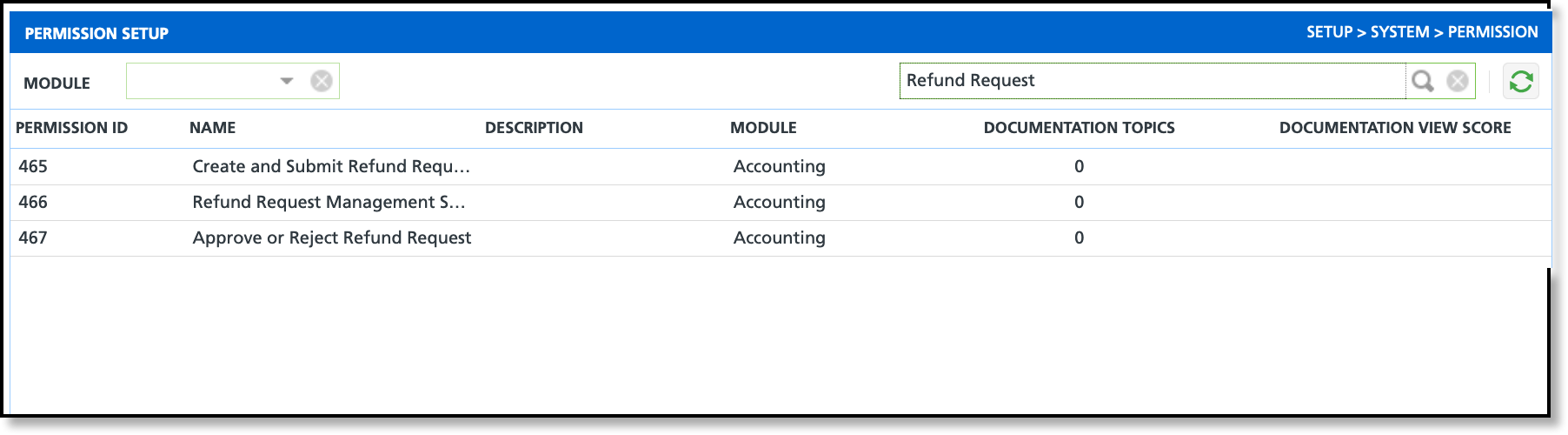
Three new permissions have been added to support refund requests. Review and assign them to the appropriate roles.
465 - Create and Submit Refund Request
466 - Refund Request Management Screen
467 - Approve or Reject Refund Request
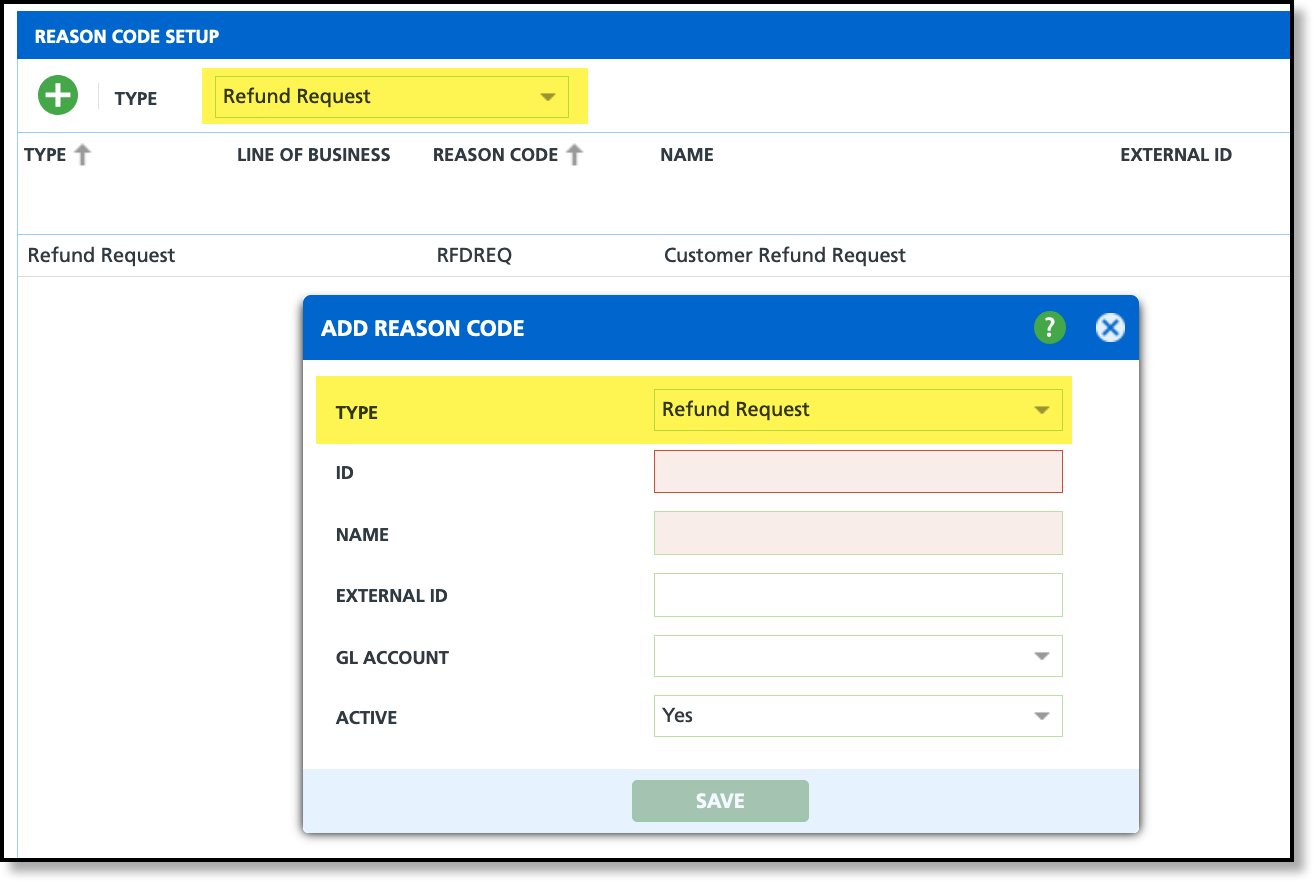
Reason Code Setup
Pathway:Setup > System > Reason Code
A new 'Refund Request' type has been added in Reason Code Setup to accurately capture the reason for refunds. This type is used when creating refund requests in the Customer Service screen.
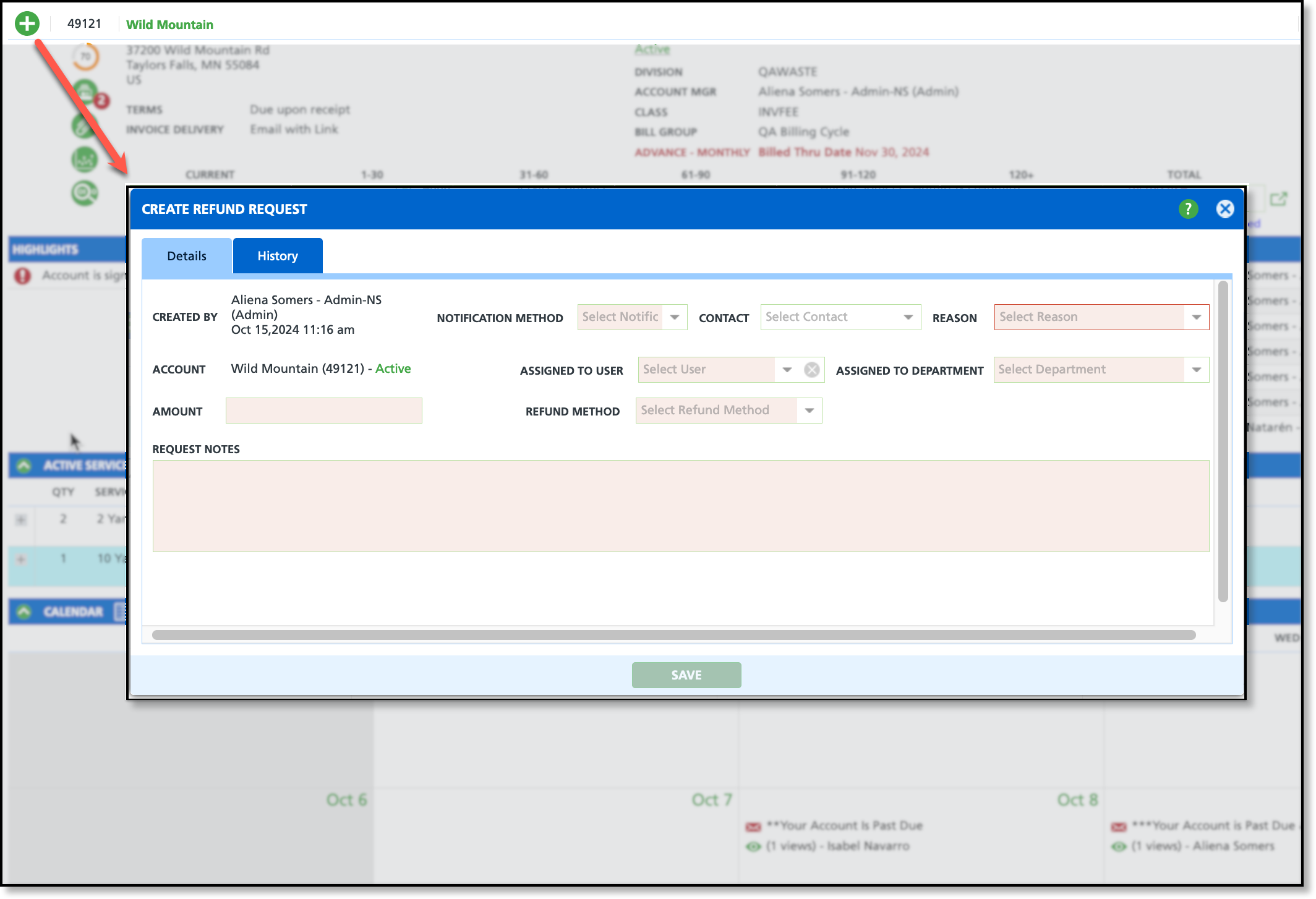
Customer Service Menu Update
A 'Refund Request' option was added to the Customer Service menu. Upon selection, a new 'Create Refund Request' screen will display.
Customer Service Screen Updates
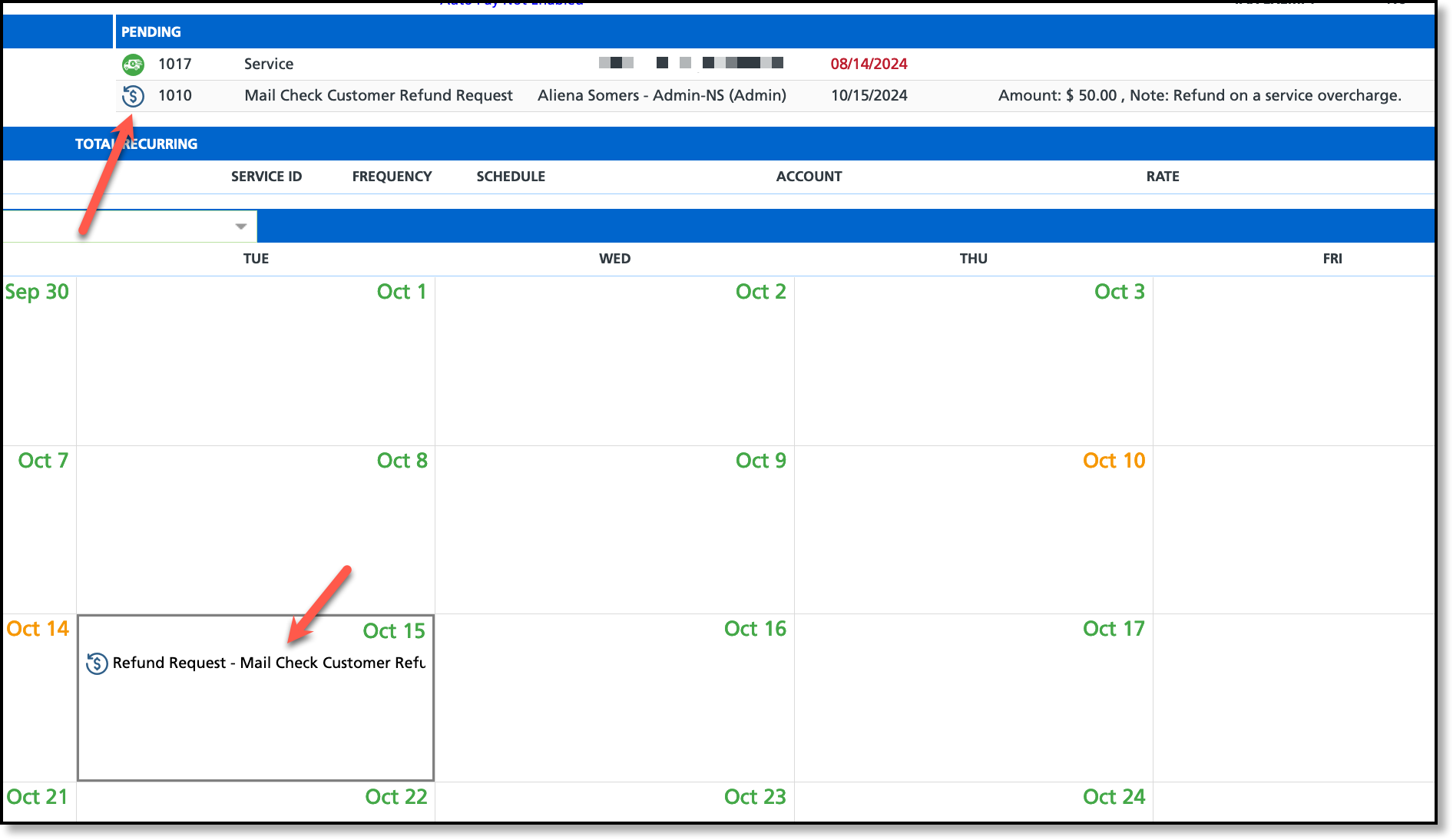
After a refund has been requested, it will display on the Calendar and in the Pending section of the Customer Service screen.
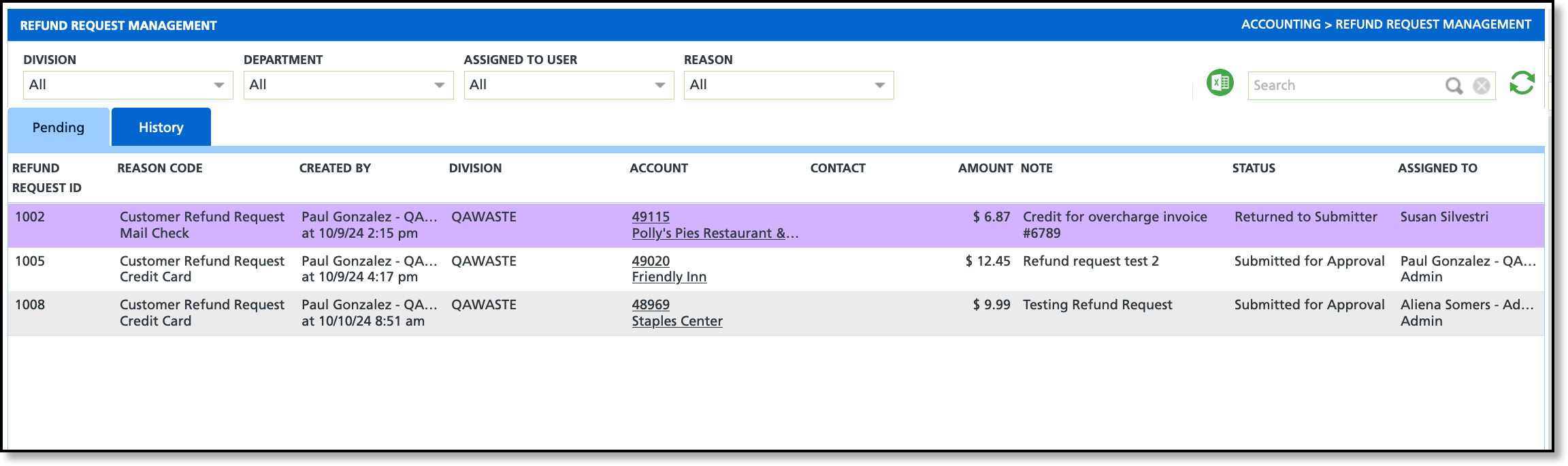
Refund Request Management
Pathway:Accounting > Refund Request Management
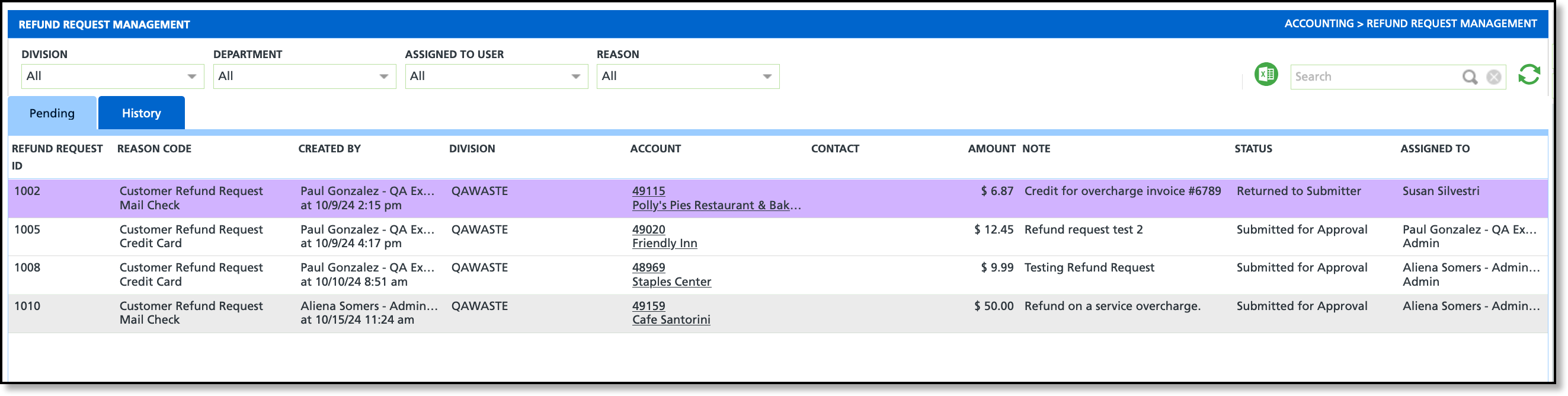
A new Refund Request Management screen has been added to the Accounting module, enabling users to manage refund requests submitted via the Customer Service screen. By double-clicking a request, users can open the Edit Refund Request popup window to approve, reject, void, edit, or return the request to the submitter.
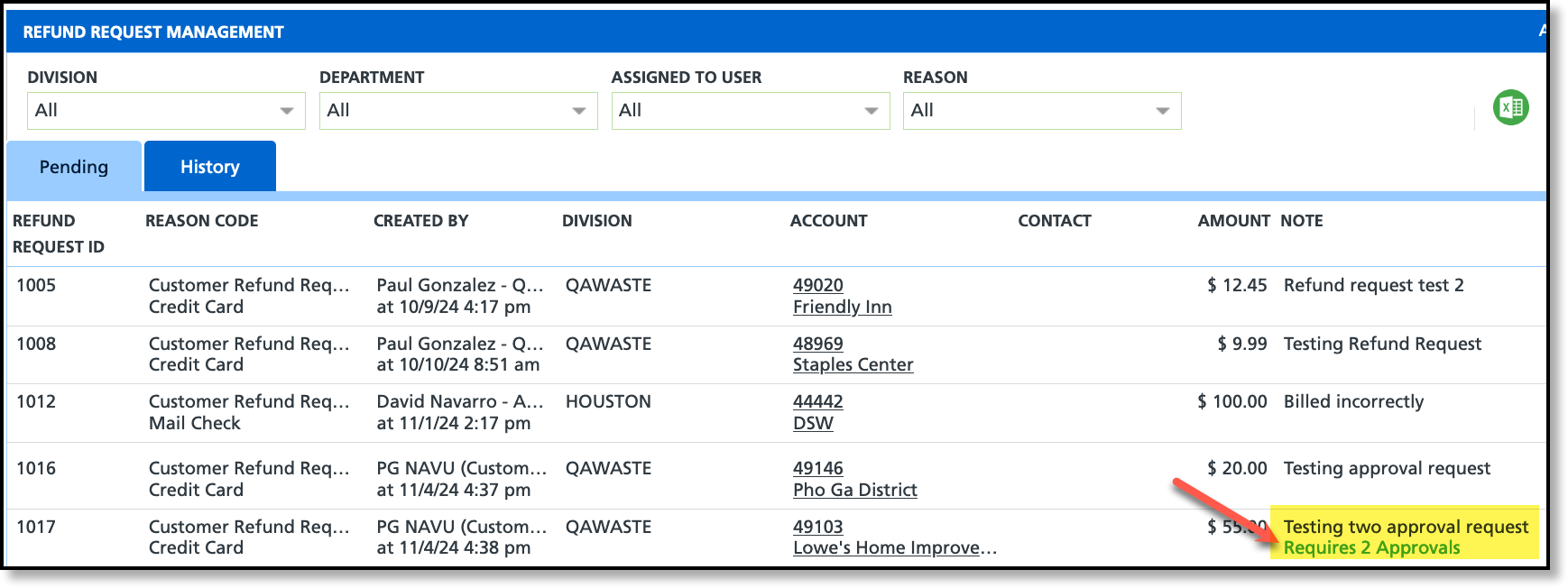
2 Approval Requirement (Optional)
Pathway:Setup > System > Division; Role
Settings in the Division and Role setup screens will include an option to require a second approval for refund requests before they can be processed.
Bill Group & Service Code (Setup) - Field Options Updated (17458)
In Bill Group Setup, the 'Anniversary 30 Day' option has been removed. In Service Code Setup, the Proration Method field has been updated to display only the options 'Calendar Days - Start and End' and 'Do Not Prorate' when the UOM is set to '4 week.'
Pathways:Setup > Services > Service Code | Setup > Accounting > Bill Group
GL Transaction Processing (Accounting) - Update to Batch Grouping to Seperate Merchant Activity from Non-Merchant Activity (16731) [New Feature]
In GL Transaction Processing, merchant activity is now distinguished from non-merchant activity with the introduction of a new 'Credit Card/eCheck Batch' type.
Pathway:Accounting > GL Transaction Processing
AR Payment Batch (Accounting) - Improvement of Payment Transfer Handling (17502)
The logic in AR Payment Batch has been updated to prevent un-posting a batch if it includes a payment transfer. If the Un-Post button is disabled, a message will display at the bottom of the screen, indicating one or more payments in the batch include: Payment Reversal, Payment Refund, or Payment Transfer.
Pathway: Accounting > AR Payment Batch
Billing (Accounting) - Hyperlinks Added to Counts (17475) [New Feature]
In Billing, the counts in the Invoice Count, Print Count, Notification Count, and Auto Pay Enrolled columns are now displayed as hyperlinks. Clicking a hyperlink opens a popup window with detailed information.
AR Aging Management (Accounting) - Min. Past Due Balance Filtering Fix (17582)
The Min. Past Due Balance filter on the AR Aging Management screen has been corrected to properly filter by the past due amount instead of the total amount.
Pathway:Accounting > AR Aging Management
AR Payment Batch (Accounting) - Logic Updated to Division Filter and Import Button (17626, 17634)
Division Filter
Previously in AR Payment Batch, selecting "All" in the Division filter loaded payment batches for all divisions, including those outside the user's access permissions. This has been updated to display payment batches only for divisions the user has access to. However, if a batch includes payments for restricted divisions, those divisions remain visible (as shown in the example image) because the user has access to the batch's primary division.
Import Button
The Import button is now disabled for posted and voided batches. Previously, it remained enabled for batches with these statuses.
Permission 109: Renamed from View Billing to View Billing and Process a Billing Batch.
This permission now controls access only to the Account / Billing screen.
Permission 281: Renamed from Edit Account Billing Settings to View / Edit Account Billing Settings.
This permission governs the ability to view and edit AR/AP settings on both the Add Account and Edit Account screens.
Permission 282: Renamed from Edit Site Billing Settings to View / Edit Site Billing Settings.
This permission governs the ability to view and edit AR settings on the Add Site and Edit Site screens.
Pathway: Setup > Permissions
AR Aging Management (Accounting) - Screen Selection Updates and Enhancements to Context Menu Actions (17441)
The following updates have been applied to the AR Aging Management screen:
Selection Model
1. Left-clicking on row:
Left-clicking anywhere within the row will cause the selection of the row.
2. Right-clicking on row:
If the row is already selected, the Context Menu will display.
If the row is not already selected, the following will happen:
Removal of all existing selections so only the right-clicked row is selected.
Popup of Context Menu
3. Addition of indicator to 'Select All/Deselect All' checkbox
Context Menu
When the Context Menu displays, it will include the total count of selected accounts. Additionally, the order in which options are displayed was updated.
Edit Account Status History
Previously, the 'Update Account Status' option was only available when a single record was selected. With this update, you can now update the status of multiple accounts simultaneously.
Billing (Accounting) - Billing Comparison Analysis Report Not Generating (17660)
An issue has been resolved that caused an internal server error when running the Billing Comparison Report, which previously resulted in no data being returned.
Pathway:Accounting > Billing
AR Aging Management (Accounting) - Auditor Column Label Updated (17394)
The logic for the Auditor header in AR Aging Management has been updated to first check the Auditor Account Label field in System Options Setup and use the value listed. If the field is empty, the header defaults to 'Auditor'.
Pathway:Setup > System > System Options > Account (tab) | Accounting > AR Aging Management
A new "Unapply All" button has been added to the Invoice Application screen for easier management.
Pathway: Accounting > AR Payment Batch
Reports
Standard Reports (AR) - Updates to Tax Details and Tax Summary Reports (17994)
The Total Sales column has been removed from the Tax Details and Tax Summary reports.
Pathway: Reports > Standard Reports > AR
AR Analysis Report (AR) - Logic Updated to Taxes and Adjustments (17993)
The logic for Adjustments and Taxes in the AR Analysis report has been updated to separately report any taxes included in an adjustment in the Taxes line. Previously, the taxes for adjustments were being included in the adjustments total line.
Pathway:Reports > Analysis > AR Analysis
Setup
Service Region Setup (Setup) - 'Require Surcharge Group' Field Added (16966) [New Feature]
Within the Service Region setup screen, a new field 'Require Surcharge Group' has been added.If enabled, the surcharge field will become a required field when adding an account or site, or editing a site.
Pathway: Setup > Services > Service Region
Reason Code Setup (Setup) - New 'Enable Temporary Service' Field Added (16950) [New Feature]
An 'Enable Temporary Service' field has been added to the Reason Code Setup screen. When enabled and the reason code is selected for an active service, the 'Duration' field will display with the options 'Permanent' or 'Temporary'. Additionally, to support the availability of temporary services, a "Temporary Service GL Account" field has been added to the following screens:
Service Code,
Charge Code
Line Of Business
Pathway: Setup > System > Reason Code
Notification Template (Setup) - Text Message Notifications Include HTML Link (16896)
Previously, invoice numbers in SMS notifications were sent with HTML markups in the link. This has been resolved to display the invoice number in plain text.
Pathway: Setup > System > Notification Template
Account Class (Setup) - Addition of Per Invoice Fees (17022, 17027) [New Feature]
A new default setting, 'Per Invoice Fee', is available in the Account Class setup screen that will be visible on the Customer Service screen and in Edit Account when configured.
Account Class Setup - Finance Charges and Other Fees
New Default Setting Fields:
Per Invoice Fee 1 (and 2) Charge Code
Per Invoice Fee 1 (and 2)
Logic:
If the Per Invoice Fee Charge Code field is blank, the Per Invoice Fee field linked to it can not be edited.
Customer Service Screen & Edit Account
Customer Service Screen:
Click within the Account Details section of the Customer Service screen to view the Paper Bill Fee
If an override exists for the account, it will be displayed first, followed by the default setting configured in the Account Class.
Edit Account:
In the Settings tab of Edit Account, the Paper Bill Fee displays as a link in the Billing section. Click on the link to open the Override Paper Bill Fee dialog, which allows the user to enter an account-level override. Note: If an override amount is entered, the user must select 'Done' for the dialog box and then 'Save' for the Edit Account screen.
Route Setup (Setup) - Option to Specify Default Truck and Driver to Each Day of Week (16997) [New Feature]
In the Add/Edit Route, users can now specify default trucks and drivers for each day of the week. Additionally, a Default Description field has been added, allowing users to include a label that will appear in parentheses after the route name in Dispatch for the specified day.
Service Region Setup (Setup) -Screen Enhancements (17037)
The following enhancements have been made to the Service Region Setup screen:
Addition of a Division filter.
A CSV export option was added.
Addition of Search.
Pathway: Setup > Services > Service Region
Line Of Business (Setup) - 'Service Description Display' Field Added (17069)
A 'Service Description Display' drop-down field has been added to the Mobile tab of the Line of Business Setup screen.
Pathway: Setup > Services > Line Of Business
Setup - Settings for Intercompany Billing Added (17053) [New Feature]
Division Setup
Inter-company tab added
Enable Disposal Billing field options:
No
Yes (Bill to Site for each transaction)
Yes (Automated GL Batch)
Bill to Site
Includes a site search to direct billing to.
Disposal Charge Code
Displays a drop down list of charge codes
Facility Setup
1. In the Facility Setup screen, an Ownership column was added with 'Internal' bolded for each facility internal is identified for.
2. When Internal is identified for a facility, the Add/Update Disposal Rate for the facility will include a 'Rate for Internal Trucks' field.
Sale Stage Setup - Verbal and Discovery Removed from Sale Stage Options (17086)
Sales stages 'Discovery' and 'Verbal' have been removed as options from the following locations:
Sale Stage Setup
Sales Rep Map
Site Status History
Pathway: Setup > Sales > Sales Stages
Add User (Setup) - Updates to 'Department' and 'Sales Goal Type' Fields (17068)
The following changes have been made to the Add User tool:
A clearing option has been added to the Department field.
A 'None' option, which is now the default setting, has been added to the Sales Goal Type field.
Pathway: Setup > System > User
Account Class Setup (Setup) - "Require Site Class" Field Added (17098)
In the Details tab of the Account Class screen, a new 'Require Site Class' checkbox has been added. This checkbox requires that a site class be selected when creating a new account or site within that account class.
Pathway: Setup > Accounts > Account Class
Line of Business (Setup) - NavuNav (Android) Setting Added (17070) [New Feature]
A new 'Service Description Display' field has been added to the Mobile tab for a Line of Business. This change affects how the service description is displayed to drivers in NavuNav (Android).
The following changes have been made to the Division Setup screen:
A green + was added to the screen to open the Add Division tool.
To edit a division, double click within its row.
The screen now includes export and refresh buttons and a search bar.
Pathway: Setup > System > Division
Reason Code (Setup) - Logic Updated to Display of Line of Business Field (17146)
Logic has been updated for the Line of Business field in the Add Reason Code screen. When 'Downtime' is selected as the Type, the Line of Business field will no longer be required.
Pathway: Setup > System > Reason Code
System Options (Setup) - Limit Material Type By Line Of Business (17142) [New Feature]
Setup Screen Changes
In the System Options Setup screen, a new field called 'Enable Limit Materials to LOB' has been added under the Operations tab. When this option is enabled, a Line of Business tab will display on the Material Type Setup screen (Setup > Operations > Material Type) when selecting a material type.
Service Code and Charge Code Updates
In both Service Code Setup and Charge Code Setup, if the above options are configured, the available material type options when adding or editing a code will be restricted based on the selected Line of Business.
Pathways: Setup > Operations > Material Type | Setup > System > System Options | Setup > Services > Service Code; Charge Code
New Account Template (Setup) - Logic Updated to Bill Group Field in Add/Edit New Account Template (17188)
A change has been made to the Add/Edit New Account Template, removing the limitation that restricted Bill Group selection based on the Division. In Bill Group Setup, if the Division field is left blank, the bill group will be universally available to all divisions in the New Account Template screen.
Pathway: Setup > Accounts > New Account / Site Template
Service Region (Setup) - Logic Updated to 'Default Online Order Sales Rep' Field (17222)
Enhancements to the Service Region Setup screen to restrict the 'Default Online Sales Rep' selection to users with permission 260, 'Assignable as Sales Rep.'
Pathway: Setup > Services > Service Region
EPA Waste Code (Setup) - Search Bar Added To Sceen (17229) [New Feature]
A search bar has been added to the EPA Waste Code Setup screen.
Pathway: Setup > Operations > EPA Waste Code
Document Format (Setup) - Update to Prefix Column for Surcharge Rates and Addendums (17233)
In the setup for contracts and proposals, if the 'Prefix' column for proposal_addendums is populated, the prefix will now appear as a bold header above the addendums. Additionally, each addendum will now be listed as a separate line item, instead of being grouped by commas as before.
This update has also been applied to surcharge_rates for PDF printing.
Pathway: Setup > Document Formats > Format
Available Charge Code (Setup) - Changes Not Saving (17257)
An issue has been resolved that prevented changes to the Available Charge Code screen from saving.
Pathway: Setup > Services > Available Charge Code
Bundle Setup - Service Region Logic Updated (17253)
The Edit Bundle tool has been updated to restrict Service Region options based on the selected Division.
Pathway: Setup > Services > Bundle
Surcharge Class (Setup) - New Surcharge Class Setup Screen Added (17232) [New Feature]
A new Surcharge Class setup screen has been added to help organize surcharges into classes. The Surcharge Class will now appear in the following screens:
Add/Edit Surcharge Setup and Surcharge Rates
Contracts and Proposals Surcharge Rates tab
Pathway: Setup > System > Surcharge Class
Service Code Setup (Setup) - Unable To Select Tax Class When Field Is Enabled (17217)
Previously, when adding a new service code in the Service Code setup, the list of Tax Class options would not display when the 'Taxable' field was enabled. This has been resolved.
Pathway: Setup > Services > Service Code
Account Class (Setup) - Credit Hold Removal Process Reverted to Process at Specified Time (17299)
Automatic Credit Hold Removal has been reverted to process only during the hour defined in the Account Class settings.
Pathway: Setup > Account > Account Class > Status Management (tab)
Service Region (Setup) - Setup for Default Service Region and Tax Region (17446) [New Feature]
Service Region and Tax Region setup screens now include a mapping feature for purposes of creating default settings for new accounts and sites. The following logic applies to support this change:
When creating a new account or site without using a 'New Account Template' or 'New Site Template,' the system automatically assigns the 'Service Region' and 'Tax Region' based on defined map areas if the address falls within a specified perimeter. If a template is used, default 'Service Region' and 'Tax Region' values are applied independently of map settings.
The GL Segmentation Setup screen now includes a Franchise Fee segmentation option. Further information on GL Segmentation Setup can be reviewed here: GL Segmentation Setup.
Pathway:Setup > Accounting > GL Segmentation
Route Setup (Setup/Operations) - Label Changed for Primary Line of Business (17533) [New Feature]
In Route Setup, the Line of Business label in Update Route has been renamed to Primary Line of Business. This label now appears in the Line of Business tab to clearly indicate the primary line of business for a route. Additionally, a count of all active site service records (those not ended) is displayed for each line of business with assigned routes.
The Rate field in the Tax Rate tab of the Tax Region Setup screen has been updated to support up to four decimal places.
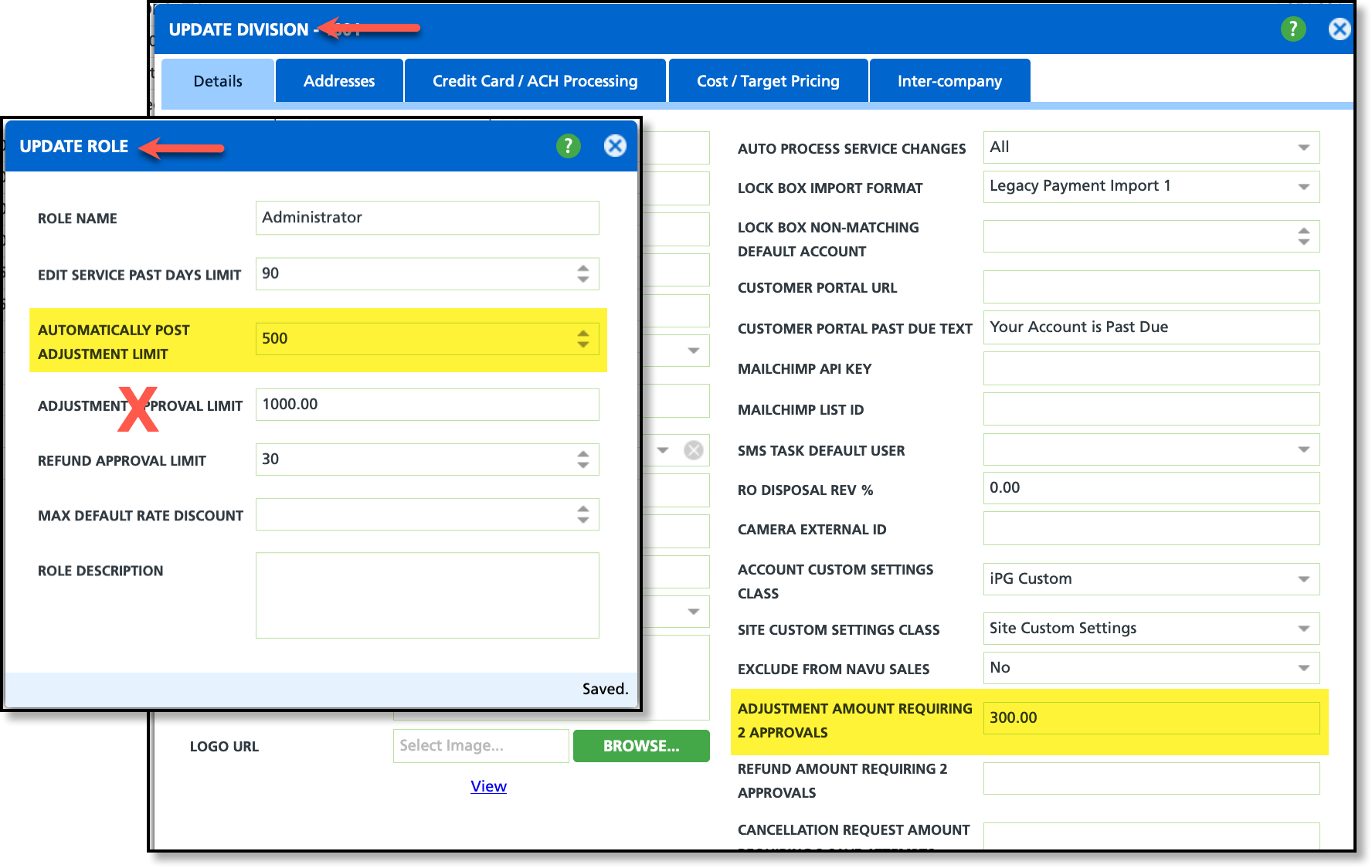
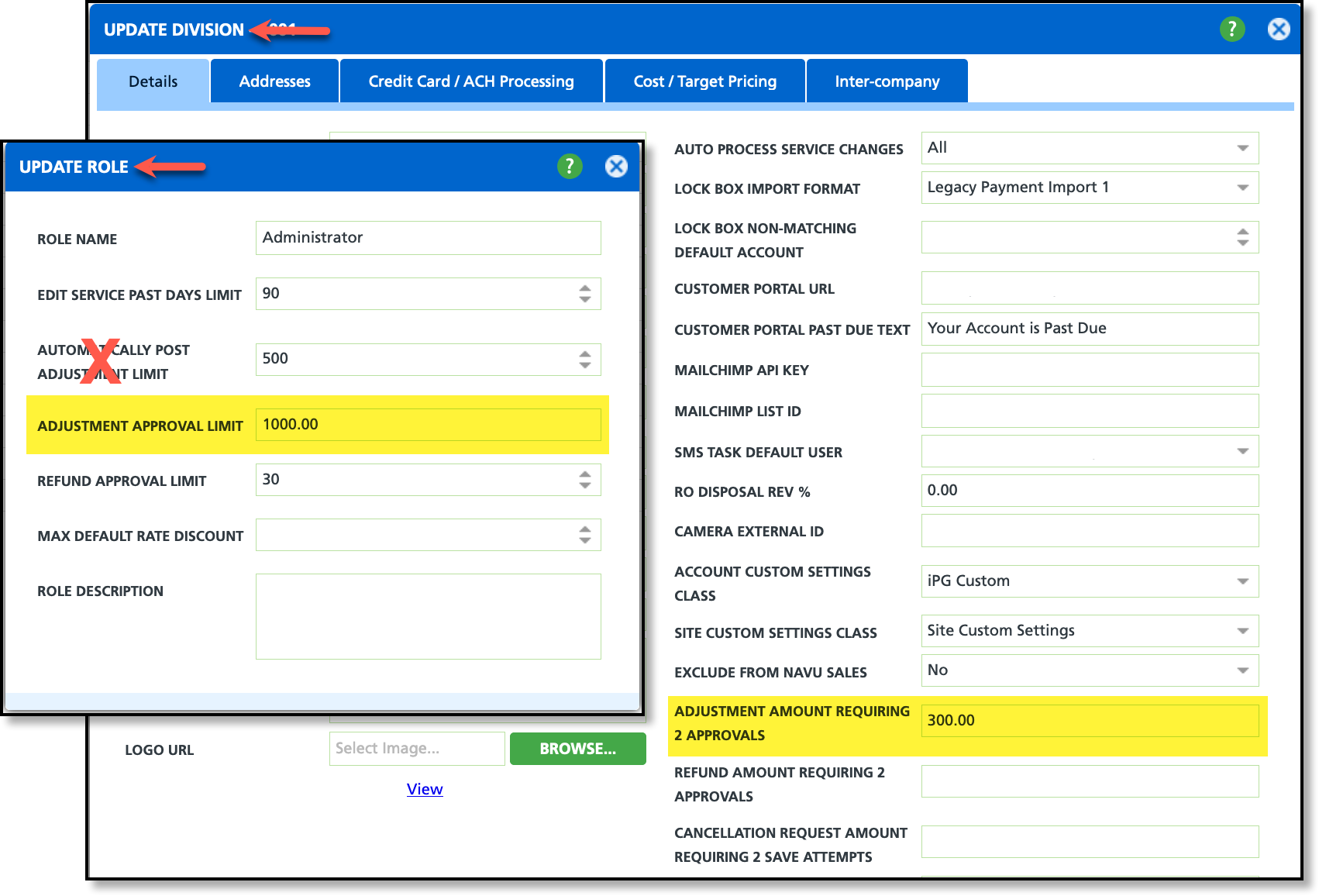
Role/Division (Setup) - Logic Updated for Invoice Adjustment Limit and Approval Limit (17607, 17740)
The rules for Invoice Adjustment Limit, Adjustment Approval Limit, and Amount Requiring Two Approvals have been updated to clarify which limit applies where.
Invoice Adjustment
Pathway:Customer Service (screen) > AR History > View Details / Adjust Invoice
Logic Update
In the Invoice Adjustment screen of AR History, invoice adjustments will only use the following two settings in Role and Division setup:
Role Setup: Automatically Post Adjustment Limit
Sets the maximum amount a user can post for an invoice adjustment. If this field is left empty, no limit applies. If an entered adjustment meets or exceeds this value, a message will notify the user of the limit, and the adjustment will not be posted.
Requires 2 approvals for posted adjustments that are equal to or greater than the amount entered here. If a user enters an adjustment within the posting limits defined in Role Setup and meets or exceeds this threshold, the post option will be available. However, a notification will alert the user that two approvals are required before posting. The second approval is captured in Accounting > Invoice Adjustment - Pending Approval and History.
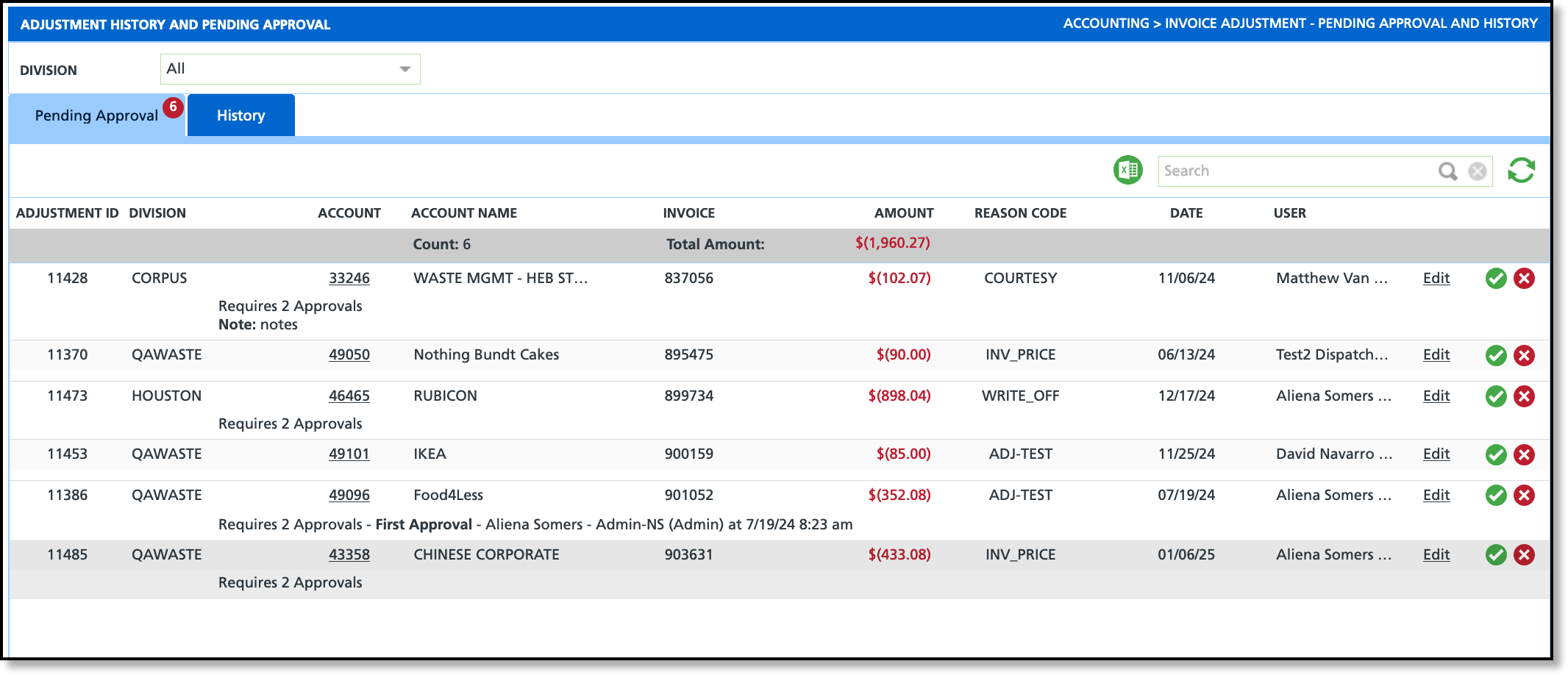
Adjustment History and Pending Approval
Pathway: Accounting > Invoice Adjustment - Pending Approval and History
Logic updates here also extended to the Pre-Billing Workflow'sPending Approval Adjustments screen in Accounting > Billing.
Logic Update
The following logic was updated to the Adjustment History and Pending Approval screen:
Role Setup: Adjustment Approval Limit
Sets the maximum amount a user can approve an invoice adjustment by and and hides the approve, deny, and edit options for pending adjustments on the Adjustment History and Pending Approval screen if the adjustment exceeds the user's approval limit set here.
The logic for the approve button has been updated to align with the Adjustment Approval Limit specified here. When a user approves an adjustment by selecting the check mark, they will be designated as the first or second approver, depending on the context.
Requires 2 approvals for posted adjustments that are equal to, or greater than the amount entered here. If no value is entered, this requirement does not apply.
Account Notification (Notification Template Setup) - Addition of Billing Address Information (17382) [New Feature]
The following division billing address information has been added to Account Statement notification template options:
division.billingaddress.line1
division.billingaddress.line2
division.billingaddress.city
division.billingaddress.state
division.billingaddress.postalcode
billinggroup.invoice_from_email
Pathway: Setup > System > Notification Template
Service Code (Setup) - New Billing Setting Added (17556) [New Feature]
A ‘Do Not Bill Until Delivery Completed’ field has been added to the Service Code Setup screen. When set to 'Yes,' billing for the service is restricted until the delivery work order is marked as ‘Service Completed.’
Pathway:Setup > Services > Service Code
Material Type (Setup) - New Line of Business Filter Added (17808) [New Feature]
A Line of Business filter option has been added to the Material Type Setup screen. This filter will only appear if the new Enabled Limit Materials to LOB setting in System Options is set to "Yes."
Pathway: Setup > Operations > Material Type | Setup > System > System Options > Operations [tab]
Service Bundle (Setup) - New Feature Online Order and Quick Order {New Feature}
The Online Order and Quick Order service bundle feature is available in the Version 74 release. Review the documentation linked at the bottom of this page for setup instructions and best practices to optimize its use.
Reason Code (Setup) - Added Option to Enable Vendor at the Reason Code Level (16973)
A new "Enable Vendor" field has been added to Reason Code Setup, appearing only for Add Service and Update Service reason codes. On the Add and Edit Active Service screen, vendor fields will be displayed if the vendor is enabled for both the reason code and the service code.
Import (Database) - Import Account Notes and Import Site Notes (17618) [New Feature]
Two new import options—Import Account Notes and Import Site Notes—have been added to the Database module. These import options are visible only to authorized users. To support this feature, two new permissions have also been introduced. Review the roles best suited for these permissions and update their status to 'Authorized' to grant access to users in those roles. Additional documentation on importing Account or Site Notes is available in the article linked at the bottom of this release note.
New Permissions to Review:
470 - Import Account Notes
471 - Import Site Notes
Pathway: Database > Import Account Notes; Import Site Notes | Setup > System > Role
Import Balance Write Off (Database) - New Import Feature (17782) [New Feature]
A new import option, Import Balance Write-Off, has been added to the Database module. This feature is accessible only to users with the appropriate authorization.
To enable this functionality, a new permission– 473 (Import Balance Write Off)– has been introduced. Review the roles that require access to this feature and update their status to Authorized as needed.
For detailed instructions and additional information, refer to the linked article below.
Pathway: Database > Import > Import Balance Write Off
 Pathway: Recent Activity and Sales Rep Homepages





 Pathway: Setup > Services > Service Code
 Pathway: Setup > Operations > Material Type | Setup > System > System Options > Operations [tab]


