Site Geocoding & Service Time - Overview
Last Modified on 07/01/2026 10:33 am PDT
Pathway: Operations > Site Geocoding & Service Time
Site Geocoding is the process of assigning precise geographical coordinates (latitude and longitude) to a service location (Site). This creates a digital "pin" on the map, which is essential for calculating route density, performing route optimization, and providing turn-by-turn navigation for drivers via the NavuNav mobile app.
The Site Geocoding & Service Time screen serves as a bulk utility to:
- View and correct non-geocoded sites.
Geocoding typically happens automatically when a CSR selects a validated address from the system’s picklist during account creation. However, if this doesn't happen or for new construction, cross-streets, or locations Google doesn't recognize, CSRs can manually geocode a site by entering the lat/long or by using this screen to have the system geocode what it can automatically.
- View and update business hours and service times for multiple sites.
Without this functionality, a user would have to navigate into each individual customer account, edit the site, and save changes—a process that could be tedious and time consuming.
This article details the functionality and purpose of each tab on the Site Geocoding & Service Time screen.

Non-Geocoded Service Addresses Tab
The Non-Geocoded Services Addresses tab is a critical "data health" utility providing a centralized list of every service location (Site) in the system that lacks geocoding. These sites are marked with a Red Exclamation Point.

Key Functionalities
Bulk Record Count: The total count of non-geocoded records (e.g., "Record(s) 29) is displayed based on the selected Division and Service Region.
Geocoding Method: This setting works in conjunction with the Geocode All button and determines whether Street Side or Roof Top precision is used when geocoding sites. By default, the setting established for the account class is used.
Geocode All button: This is the primary functionality on this tab. With one click, the system attempts to automatically find coordinates for every address in the list. Any address it can resolve is immediately updated across the entire system (Dispatch, Customer Service, and the Driver Tablet).
Manual Correction Path: For addresses that the bulk tool cannot fix (like "1234 XXX"), the tab provides a Hyperlink directly to the customer account. This allows staff to manually investigate, contact the customer, or enter Latitude/Longitude coordinates manually.
For more details, see our article on Geocode Correction - Bulk Geocoding and Map Auditing.
Field Descriptions
| Upper Grid |
Filters |
|
| Division | Select a division to see the list of service regions to filter by.
|
| Service Region | Select one or All service regions to see only those service sites in the selected service region for a given division that are currently not geocoded.
|
| Geocode Type Method | Choose Street Side or Roof Top to manually override the default method selected when setting up the Account Class.
|
| Interactive Features |
| Geocode All | Click the Geocode All button to have the system attempt to geocode the service sites listed that currently are not geocoded. If successful, the site will be removed from this list.
|
| Fields |
|
| ID | The unique identifier for a Service Site.
|
| Site Name | The name of the service site.
|
| Address | The primary geographical identifier for a service site consisting of either a street address or lat/lon coordinates.
|
| Neighborhood | The name of the neighborhood that the service site is located in.
|
| City | The name of the city the service site is located in.
|
| State | The name of the state the service site is located in.
|
| Postal Code | The postal code associated with the service site location.
|
| Country | The name of the country the service site is located in.
|
Bulk Map Geocode Tab
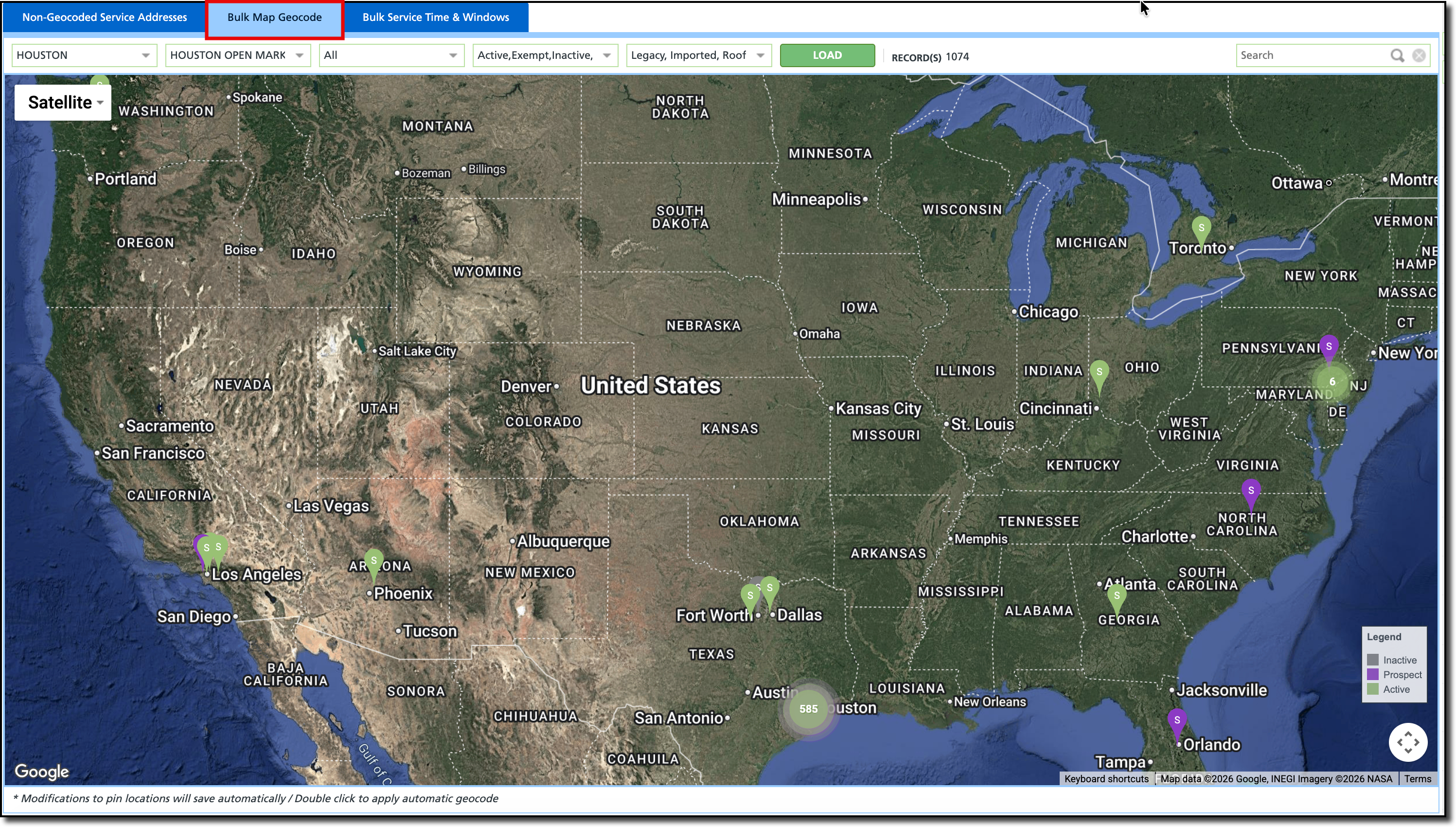
The Bulk Map Geocode tab provide a "bird's-eye view" of all service locations (Sites) on a single map. While other tabs use lists and text, this tab identifies geographical data errors that are only obvious when seen visually. This is considered the best way to find "rogue pins" (service locations that have been geocoded incorrectly). It is essential for maintaining Route Health.
By ensuring all pins are accurately placed, the system can provide more precise turn-by-turn directions, more accurate "Arrival" timestamps, and more reliable data for Route Optimization.
Key Functionalities
ALERT: Any movement of a pin on this map is saved automatically and updates the driver's tablet immediately. This ensures the driver has the most accurate "stop" location for their next service. Note the message at the bottom of the screen.
Global Map View: Displays every geocoded site within the selected Division and Service Region as a pin on the map.
Bulk Record Count: The total count of records (sites) found is displayed based on the filtering.
Interactive Correction: Users can click and drag any pin on the map to move it to its correct location (e.g., moving a pin from in Florida to a correct location in Houston or moving a pin from the front of a building to a specific alleyway or loading dock).
For more details, see our article on Geocode Correction - Bulk Geocoding and Map Auditing.
Field Descriptions
| Upper Grid |
Filters |
|
| Division | Select a division to see the list of service regions to filter by.
|
| Service Region | Select one or All service regions to see only those service sites in the service region(s) selected for a given division.
|
| Line of Business | Select one, multiple, or All Lines of Business to see only those service sites for the line of business(es) selected in the service region(s) selected for a given division.
|
| Status | Select one, multiple, or All Status types to see only those service sites with the status(es) selected for the line of business(es) selected in the service region(s) selected for a given division.
|
| Geocoding Type | Select one, multiple, or All geocode types to view only those service sites with type of geocode setting.
|
| Interactive Features |
| Load | Click the Load button, to display the services sites pins on the map based on the filters selected.
|
| Drag and Drop | Click on any pin and drag it to the correct location. This is automatically saved and affects dispatch and routes immediately.
|
| View Site Info | Click on a pin to view the site name, id, address and service associated with that site.
|
| Auto Geocode | Double-click on a pin to have the system attempt to auto geocode.
|
Map Navigation Controls
| Panning, Zooming, Map layers, Street view
|
| Non Interactive Map Features |
| Legend | The pins are color coded based on the status of the service site (prospect, active, vacation hold, etc.)
|
Bulk Service Time & Windows Tab
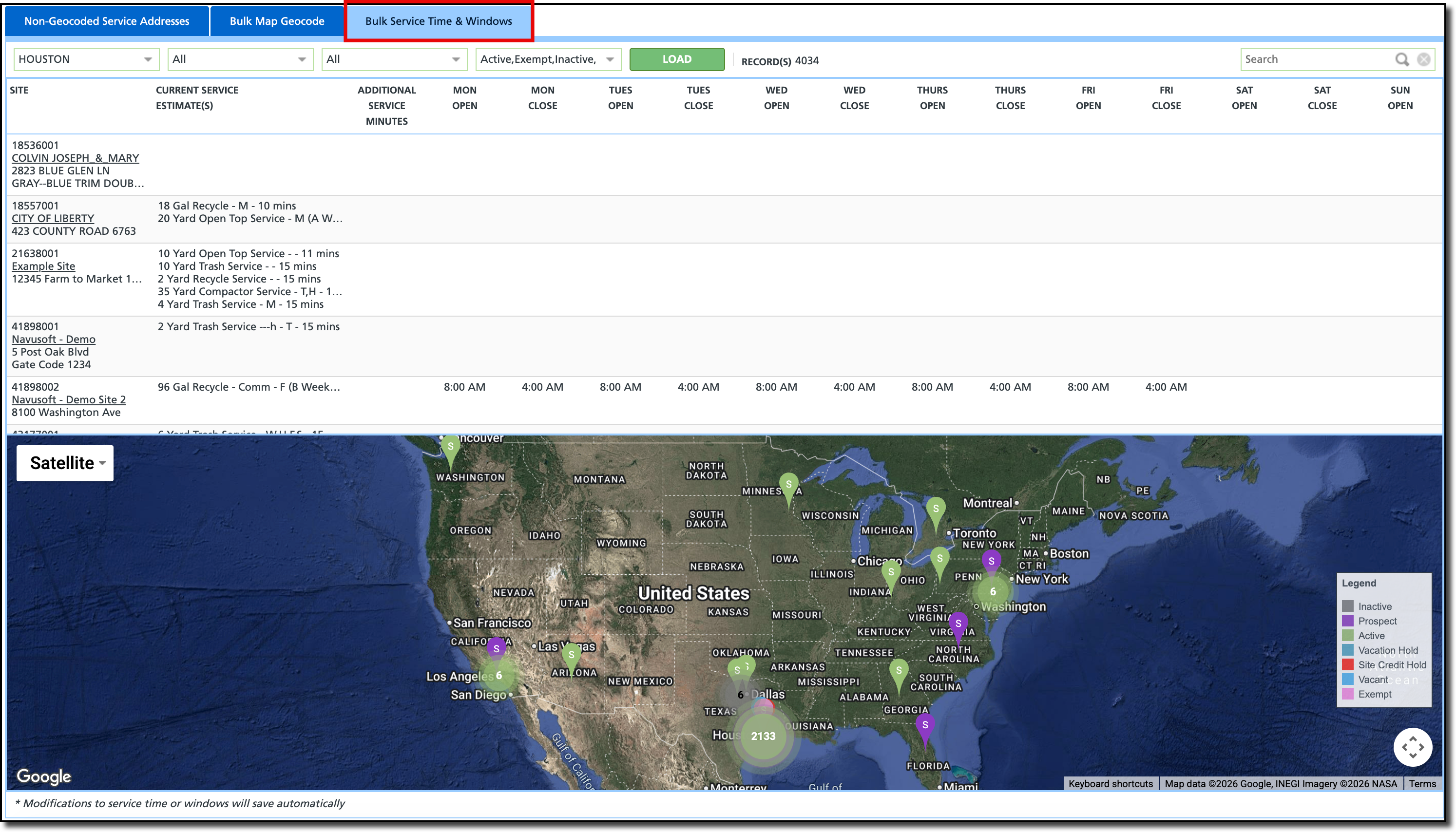
The Bulk Service Time & Windows tab is a high-efficiency management utility designed to handle the time-based constraints of service locations (Sites) without requiring users to open individual customer accounts.
Business hours and service times feed directly into route optimization and triggers the color-coded clock icon on the driver's tablet to indicate if a site is currently open or closed.
Key Functionalities
ALERT: Any modifications to service time or windows will save automatically. This message is displayed at the bottom of the map.
Centralized Time Management: Allows users to view and edit Business Hours (Open/Close times) for multiple sites at once without opening individual customer accounts.
Service Time Padding: Enables the adjustment of Additional Service Minutes to account for site-specific delays (e.g., waiting for security or navigating difficult access points).
Integrated Map Correction: Features a map at the bottom of the screen where users can visually verify a site's location and drag-and-drop the pin to re-geocode it on the fly.
Field Descriptions
| Upper Grid |
Filters |
|
| Division | Select a division to see the list of service regions to filter by.
|
| Service Region | Select one or All service regions to see only those service sites in the service region(s) selected for a given division.
|
| Line of Business | Select one, multiple, or All Lines of Business to see only those service sites for the line of business(es) selected in the service region(s) selected for a given division.
|
| Status | Select one, multiple, or All Status types to see only those service sites with the status(es) selected for the line of business(es) selected in the service region(s) selected for a given division.
|
| Interactive Features |
| Load | Click the Load button, to list the services sites and display their pin on the map based on the filters selected.
|
| Modify Service Times (grid) | Click on the grid cell area for a given day (open or close) and enter the time. |
| Modify Service Minutes (grid) | Click on the grid cell area for additional service minutes and enter the number of minutes that might be needed to service this site.
|
| View Site Info (map) | Click on a pin to view the site name, id, address and service associated with that site.
|
Map Navigation Controls (map)
| Panning, Zooming, Map layers, Street view
|
| Non Interactive Map Features |
| Legend | The pins are color coded based on the status of the service site (prospect, active, vacation hold, etc.)
|
| Field | Description |
| Site | Information about the site including ID, name, address.
Click on the name hyperlink to open the site account.
|
| Current Service Estimate(s) | The estimated time currently that it takes to service that site.
|
| Additional Service Minutes | An editable field that allows an increase in service time.
|
| Mon-Sun (Open) | Displays when a site is closed for servicing, if the information has been provided. This will be displayed on the driver's tablet and is used for route optimization.
To enter a value, click in the cell area.
|
| Mon-Sun (Closed) | Displays when a site is closed for servicing, if the information has been provided. This will be displayed on the driver's tablet and is used for route optimization.
To enter a value, click in the cell area.
|
Setup
Service Site Geocoding is set up at the Account Class level. This determines where the pin is located for the driver during pickup and for routing.
Pathway: Setup > Account > Account Class Setup > Details [tab]
The Default Geocoding Type is defined as either Roof Top or Street Side.
- Rooftop - pinpoints the exact center of a building or structure. Used for identifying a specific location for a service.
- Street Side - places the geocode on the road segment, usually at the driveway entrance. Ideal for active routing and navigation for the truck driver.

Permissions
The following permissions are required to view and use the [Screen Name] screen:
| Permission ID | Permission Name |
| 209 | Site Geocoding & Service Time |
Related Articles
Geocode Correction - Bulk Geocoding and Map Auditing
Route Optimization


