Build a New Article
Last Modified on 02/27/2026 7:52 am PST
Titling Conventions
New Screens
When a new screen is released, the overview article must use the exact same name as the screen.
Process/Workflow Articles
This is ultimately up to the author and how they prefer to name the article. As a best practice, use the action being performed as the title. For example, in AR History there are several actions users can take, such as generating an invoice or applying a payment. In those cases, the article title could be “Apply a Payment” or “Apply a Payment in AR History.”
Release Notes
To ensure release notes can be attached to support tickets indicating an issue has been resolved, each release note should be created as a separate, standalone article. Release note titling conventions differ from other article types. The title should begin with the screen name, followed by the module in parentheses, then a brief description, and finally the JIRA number so internal staff can easily reference it in Jira.
Example: AR History (Accounts) - Anniversary Billing Date Calculation Updated on Preview Invoice Screen (20385)
Body of Article
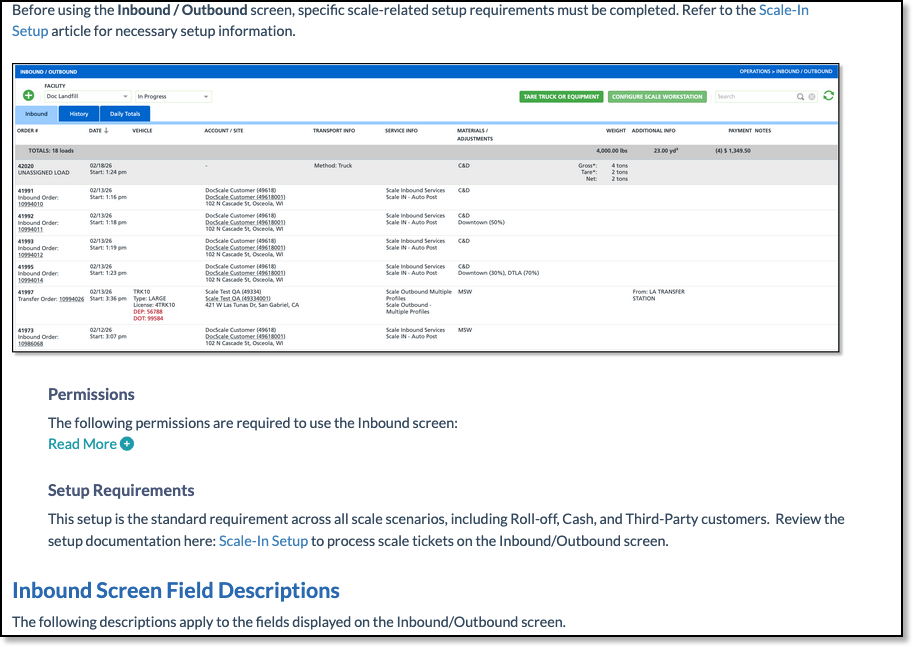
For most overview articles that simply capture the functions and purpose of a screen, the template is very basic. This specific style is most commonly used when documenting screens in the Setup module. For screens outside of Setup, there may be multiple ways to complete a task depending on configuration, or an “if this, then that” process. The Inbound Ticket Creation document is a good example of this approach.
Main Components
The body of the article should follow a similar template as shown here.
- The pathway is displayed at the top. Bold the word Pathway and then italicize the pathway.
- A brief description capturing the purpose of the screen.
- An image. This can be a single image of the screen, or something similar to below.
- Permissions table.
- Fields and Descriptions table. While this section may start out basic, it allows for logic and hyperlinks to be added over time. In many cases, a screen is built and released before all functionality is complete. We do our best to document what’s available, but sometimes the foundation is created first, with plans to expand and fill in the details later.
- Setup Steps or process outline. Here again, it may start out basic, but many times we refer back and expand on these with new logic and call-outs.
- Related Articles: Most articles include a Related Articles section, which is a great way to link related content and processes together. One benefit is that you can customize the title as it appears in the Related Articles list. This is especially helpful when creating process documentation and guiding readers to the next step in the workflow.

Other Items
Referencing the Inbound Ticket Creation article, there are not only permissions that control what a user can do, but also setup requirements. In that case, add a Setup Requirements sections below the permissions table to capture what prior setup is needed to operate within the screen.
Related Articles
Versioning Existing Articles
Snagit
Best Practices (Includes how to link articles)

