The release notes in this article correspond to release version 75. Screens and logic may have changed in newer versions.
Helpful Tip: To search all text using CTRL-F, you must first click on the Expand All Sections button.
Accounts
An issue that prevented work order creation when adding a new service to a contract has been resolved. Previously, if a service not already established on an account was added, the system failed to trigger the delivery work type event.
Pathway: Accounts > Orders, Quotes and Contracts A new 'VIP' priority indicator has been added to the Add/Edit Site screen to designate service locations with VIP status. When selected, this indicator will appear on the Customer Service screen, in Dispatch on the Services List, and on the driver app. Note: this is a visual indicator only and does not impact routing or scheduling logic.
Previously, editing a truck from the Site Inventory screen triggered a full refresh of the account and related fields after each save, causing the screen to blink and making it difficult to edit multiple fields within the popup. Logic has been updated to delay the screen refresh until the popup is closed.
An issue has been resolved that prevented service records from being generated when processing a price decrease through a contract.
When assigning a contact as Primary Billing Contact 2, the system was incorrectly saving them as Primary Billing Contact 1.
Pathway: Accounts > Customer Service Screen > Contacts An issue has been resolved that caused an error message to appear when a user attempted to process a write-off in AR History.
Pathway: Customer Service Screen > AR History Suggested Service Regions have been added to the Add Account and Add Site screens. Suggested regions are determined based on the address's latitude and longitude, falling within the polygon defined in Service Region Setup.
Pathway: Accounts > Add Account / Add Site An issue has been resolved where charge codes were duplicated when a service had a pending change, either through the Edit option or a Rate Update Batch, with a future start date and an additional edit was applied.
Proposals and Contracts now support sending documents to contacts via text message for viewing and signing. To accommodate this enhancement, the Send Email button has been replaced with a Send Notification drop down, offering options for Email and Text Message. Similar to the email method, if a contact is associated with the account, they will display in the Send to Contact drop down for quick selection.
Pathway: Accounts > Orders, Quotes and Contracts The logic for the Charge Code field in the Add/Edit Manual Charge screen has been updated to prevent charge codes without "Enable Manual Charge" set to "Yes" from appearing when using the field as a search box.
Pathway: Setup > Services > Charge Code | Customer Details > Calendar [Add Manual Charge] An issue has been resolved in Edit Active Service that caused the previous service day(s) to be retained when a new service day was selected and saved.
Pathway: Customer Service (Accounts) > Edit Active Service Previously, when the service was updated to a monthly frequency and the service day remained the same, service records were not being generated. This issue has been resolved.
Pathway: Customer Service (Accounts) > Edit Active Service The following enhancements have been applied to shared services:
The Wallet feature is now available for prospect accounts. When viewing the Account Wallet for a prospect, the View History and Post Payment columns are hidden.
Pathway: Customer Service Screen > Wallet (Account Details) The logic for the Surcharge Group field has been updated to exclude inactive surcharge groups from the drop down list.
Pathway: Customer Service Screen > Site Details [right click] > Billing Settings [Edit Site} Posting status logic within the service record has been updated, affecting the following permissions: 341 (Change Work Order to Ready to Post), 342 (Change Work Order to Posted), and 472 (Reverse Work Order Posting Status).
Scenario Examples
Pathway: Service Record | Setup > System > Permission When a service was terminated during a billing period that had already been invoiced, and proration was configured for the service code, the prorated credit amount did not display on the Edit Active Service screen. This has been resolved.
Pathway: Customer Service Screen (Accounts) > [Edit] Active Service An issue has been resolved that prevented the Auto Apply link in AR History from applying unapplied payments to open invoices.
Pathway: Customer Service Screen (Accounts) > AR History An issue has been resolved that prevented disposal tickets from being saved when LEED tracking was enabled for the site.
Pathway: Customer Service Screen > [select] Work Order An issue has been resolved where notes entered by the driver in NavuNav for stops marked with an Exception were not displaying in the Completion/Exception Notes field of the Service Record.
The Timeline tab for Service Records is now available for work orders with a status of "In Progress." Previously, it was only available for work orders with a status of "Not Serviced" or "Completed."
Pathway: Customer Service Screen > Service Records {selection} An issue has been resolved where selecting Company in the Equipment Ownership field did not save.
Pathway: Customer Service Screen > Active Services An issue has been resolved that prevented lost proposals with close notes longer than 30 characters from opening to view details.
Pathway: Customer Service Screen > Orders, Quotes and Contracts An issue has been resolved that caused the link to view a work order or scale ticket from an invoice to return an internal server error.
Pathway: Customer Service Screen > AR History If the site’s bill group is set to Anniversary and the UOM for the selected Service Code is either 'Service' or '4 Week,' the Minimum Per 4 Week field will appear on the Add and Update Active Service screen.
Users with permission 480 (Edit PO Number on Invoice Detail) can now add and edit a PO number to an invoice even after it has been generated. This enhancement helps ensure invoices meet customer requirements without the need to regenerate or adjust billing outside the system.
To enable this feature, edit each applicable role in Role Setup and change the permission from New to Authorized.
Pathway: Accounts > AR History If the site’s bill group is set to Anniversary and the UOM for the selected Service Code is either 'Service' or '4 Week,' the Minimum Per 4 Week field will appear on the Add and Update Active Service screen.
Users with permission 480 (Edit PO Number on Invoice Detail) can now add and edit a PO number to an invoice even after it has been generated. This enhancement helps ensure invoices meet customer requirements without the need to regenerate or adjust billing outside the system.
To enable this feature, edit each applicable role in Role Setup and change the permission from New to Authorized.
Pathway: Accounts > AR History If a service has an applicable recurring minimum charge, it will display as a separate line item when not included in a charge grouping on the following:Work Order (Accounts) - Work Order Not Generated When Adding a New Service to a Contract (18123)

Customer Service (Accounts) - VIP Priority Sites (18297) [New Feature]

Site Truck Inventory (Accounts) - Edit/Save Logic Updated (17891)

Orders, Quotes and Contracts (Accounts) - Proposal/Contract Price Change Doesn’t Recreate Service Record (18154)

Contacts (Accounts) - Contact 2 Selection Defaults to Primary Billing Contact 1 Upon Save (18192)

AR History (Accounts) - Error Message Displays When Attempting to Process a Write-Off (18111)

Add Account & Add Site (Accounts) - Display 'Suggested' Service Regions (18433)

Edit Active Service (Accounts) - Updates to Future Site Service Charges (18085)

Contracts/Proposals (Accounts) - Ability to Text Message Documents for Viewing and Signing (18405) [New Feature]

Add Manual Charge (Accounts) - Logic Updated to Charge Codes Disabled from 'Manual Charge' (18703)

Customer Service (Accounts) - Updating Service Keeps Prior Scheduled Day (18364)

Customer Service (Accounts) - Frequency Logic Updated When Changing Frequency to Monthly (18587)

Shared Services (Accounts) - Enhancements to Parent and Child Sites of Shared Services (18509)
Parent Site of a Shared Service

Child Site of a Shared Service

Wallet (Accounts) - Wallet Feature Now Available to Prospect Accounts (18797) [New Feature]

Billing Settings (Accounts) - Logic Updated to Surcharge Group Billing Setting (18767)

Service Records (Accounts) - Updates to Posting Permissions (18768)

[75.1 Release] Edit Active Service (Accounts) - Credit Amount Not Displaying for Ended Services with Proration Configured (18986)

[75.1 Release] AR History (Accounts) - Auto Apply Process Not Applying Unapplied Payments (18988)

[75.1 Release] Work Orders (Accounts) - Unable to Save Disposal Ticket When LEED is Enabled on the Site (18978)

[75.1 Release] Service Records (Accounts) - Driver Notes for Exceptions Not Visible on Work Order (19012)

[75.1 Release] Service Records (Accounts) - Update to Timeline Tab (16498)

[75.1 Release] Site Service (Accounts) - Equipment Ownership Set to ‘Company’ Not Saving Correctly on Services (18295)

[75.1 Release] Orders, Quotes and Contracts (Accounts) - Lost Proposal with Close Notes Over 30 Characters Could Not Be Opened (18270)

[75.1 Release] AR History (Accounts) - Invoice Link to View WO or Scale Ticket Returns Error (18138)

[75.1 Release] Service Records (Accounts) - Logic Updated to Site Service Recurring Minimum (17995)

Setup Reference

[75.1 Release] AR History (Accounts) - Ability to Add and Edit PO Number on Invoice Details (17383) {New Feature}

[75.1 Release] Service Records (Accounts) - Logic Updated to Site Service Recurring Minimum (17995)
Setup Reference
[75.1 Release] AR History (Accounts) - Ability to Add and Edit PO Number on Invoice Details (17383) {New Feature}
[75.1 Release] AR History (Accounts) - Addition of Service Minimum on Invoices (18725)

Sales
The following enhancements have been made to the Rate Update batch screen:
The Reverse button is only displayed when the batch is in a Posted status. Pathway: Sales > Rate Update Batches The following updates were applied to the Surcharge Management screen:
Pathway: Sales > Surcharge ManagementRate Update Batch (Sales) - Enhancements and Additions to Screen and Batch Creation (18480)
Rate Update Batch (Main Screen)

Create a New Batch

Both batch creation options require using the "Add Filter" feature to narrow the batch to a specific set of sites. While this filter functions similarly to the Database Query filter, it does not support grouping conditions with AND/OR logic.
Reverse a Batch
An option to reverse a batch has been added, along with the following logic to prevent a reversal in certain cases:

Total Count Updates

The total count has been moved to display at the top of the grid, whereas it was previously shown below it. Surcharge Management (Sales) - Added Ability to Export/Import Multiple Surcharge Rate Changes (18345)

Operation
The Service Region filter has been relocated to an optional side screen filter, enabling additional filtering after the results have loaded.
Pathway: Operations > Route Management > Current [tab] The following changes have been made to support multiple profiles and materials: Pathway: Setup > Operations > Work Type
Pathway: Search > Work Order
Pathway: Operations > Inbound/Outbound A Default Origin dropdown has been added to the Create Inbound Order screen to streamline capturing the material origin, when the Require Source Location setting in Work Type Setup is set to either Require Material Origin or Optional Material Origin. Upon save, the origin's record is set to 100%, and any changes can be made in the Origins tab within the service record.
The drop down will display only origins that meet the following criteria: The origin is marked as Active The origin has no designated division (division is null) The origin's division is the same division as the selected disposal location (facility).
Pathway: Operations > Inbound / Outbound On the Current tab in Route Management, double-clicking a site to display its location on the map previously failed to show nearby location pins. This has been resolved.
Pathway: Operations > Route Management - Current [tab] An issue has been resolved where disposal records entered for a route were not appearing in the Disposal Activity screen under the Line of Business (LOB) assigned to that route.
Pathway: Operations > Disposal Activity The logic for the Service Record has been updated to ensure the full Service ID is displayed alongside service codes with longer names. Previously, the Service ID was not shown when the service name was too long.
Pathway: Search > Work Order In the Route Management (Current) tab, the "Navusoft File Format" option for both Export and Import has been renamed to "Navusoft/Zignex File Format."
Pathway: Operations > Route Management > Current [tab] Article: Export and Import - Route Management In Route Summary, the 'Avg Hours' Summary Type has been removed and will be delivered on a different form on a future release.
Pathway: Operations > Route Management Change Sequence has been re-added as a right-click menu option to the Route Dispatch Map.
Pathway: Operations > Dispatch An issue has been resolved that triggered an error when users attempted to bulk post a high volume of service records in the Dispatch screen.
Pathway: Operations > Dispatch > Services List Engine hour tracking has been added to the following screens: In Dispatch, an Engine Hours column has been added as a hyperlink that opens the Truck Productivity screen (formerly Truck Odometer). Within the Truck Productivity screen, Start Engine Hours and End Engine Hours columns have been added, both of which are editable.
In the Truck and Route Calendars, total engine hours for the day are now displayed in the route details for each day.
Engine Hours has been added to the route and truck summary details as a hyperlink that opens the Truck Productivity window.
In Truck Setup, the Last Productivity column now includes Engine Hours as a hyperlink. When selected, it opens the Truck History popup, where the Start and End Engine Hours columns are also visible.
Tracking for in-state and out-of-state mileage is now available on the Truck Productivity screen (Operations > Dispatch > Driver Timeline) and in NavuNav. When a driver updates the state or province in NavuNav, the change will automatically reflect in Dispatch. From the Check In screen, drivers can select the state or province where they are servicing sites. This selection is also displayed on the Check Out screen. To clear a selection, an empty space is provided in the drop down for the driver to select. If a driver needs to update the state or province they are servicing, a "Change State / Province" option is available in the NavuNav menu drop down. To clear a selection, an empty space is provided in the drop down for the driver to select. Engine hour tracking has been added to the following screens: In Dispatch, an Engine Hours column has been added as a hyperlink that opens the Truck Productivity screen (formerly Truck Odometer). Within the Truck Productivity screen, Start Engine Hours and End Engine Hours columns have been added, both of which are editable.
In the Truck and Route Calendars, total engine hours for the day are now displayed in the route details for each day.
Engine Hours has been added to the route and truck summary details as a hyperlink that opens the Truck Productivity window.
In Truck Setup, the Last Productivity column now includes Engine Hours as a hyperlink. When selected, it opens the Truck History popup, where the Start and End Engine Hours columns are also visible.
An issue that prevented equipment details from displaying at the bottom of the Inventory Management screen has been resolved.
Pathway: Operations > Inventory Management An issue that prevented labor hours from being viewed or edited has been resolved.
Pathway: Operations > Dispatch [Route Data Entry (view)] > Worker Labor Hours An issue has been resolved that prevented payments from displaying on the Work Order Payments Report that is generated from the Daily Totals tab of the Inbound/Outbound screen.
Pathway: Operations > Inbound / Outbound > Daily Totals [tab] An issue has been resolved in the Pending tab of the Route Management screen where the Day of Week drop down was not populating for EOW services.
Pathway: Operations > Route Management An issue has been resolved that caused a black box to display in place of driver signatures captured in NavuNav.
Pathway: Operations > Dispatch > Pre-Trip Inspection ResultsRoute Management (Operations) - Service Region Filter Relocated (18115)

Inbound/Outbound (Operations) - Support for Multiple Profiles and Materials (18030)
Modifications to Work Type Setup
1. 'Enable Load Material Composition' has been renamed to 'Load Material Composition'.
2. The 'Yes' option for Load Material Composition has been renamed to 'Enable Multiple Materials' and a new option 'Enable Multiple Profiles and Materials' was added. 
Edit Service Record Modifications

The following changes have been made to the Materials tab:
Modifications to Inbound/Outbound and History Grids
The following modification was made to the Inbound,Outbound and History tab grids:

Inbound / Outbound (Operations) - Default Origin Field Added to 'Create Inbound Order' (18307)

Route Management (Operations) - Logic Updated to Nearby Pins on Map (18352)

Disposal Activity (Operations) - Logic Updated for Disposal Records and LOB Assignment (18146)

Service Records (Accounts) - Display of Service ID (18508)

Route Management (Operations) - Import/Export File Format Renamed (18595)

Route Summary (Route Management) - 'Avg Hours' Summary Type Removed (18769)

Route Management (Operations) - Import/Export File Format Renamed (18595)
Dispatch (Operations) - Change Sequence Re-Added to Map (18065)

Dispatch (Operations) - Error Received When Trying to Post Larger Routes (18103)

Dispatch (Operations) - Ability to View and Manage Engine Hours (18344) [New Feature]
Dispatch and Truck Productivity

Truck and Route Calendars

Driver Timeline

Truck Setup and Truck History

NavuNav (Android) - Support for Tracking In-State and Out-of-State Mileage (18404) [New Feature]
Truck Productivity - Dispatch (Driver Timeline)

NavuNav - Driver Check-In

NavuNav - Driver Menu Options

Dispatch (Operations) - Ability to View and Manage Engine Hours (18344) [New Feature]
Dispatch and Truck Productivity
Truck and Route Calendars
Driver Timeline
Truck Setup and Truck History
Inventory Management (Operations) - Equipment Details Not Displaying at the Bottom of the Inventory Management Screen (18977)

Dispatch (Operations) - Unable to View and Edit Labor Hours (18981)

[75.1 Release] Inbound/Outbound (Operations) - Payments not Displaying on Work Order Payments Report (19005)

[75.1 Release] Route Management (Operations) - EOW Services Not Populating Day of Week Drop Down (18265)

[75.1 Release] Dispatch (Operations) - Blacked-Out Signatures Uploading from NavuNav (19206)

Accounting
The AR Payment Batch screen has been updated to disable the Deposit and Auto Apply fields for posted batches. Additionally, the 'Apply,' 'Delete,' and 'Pencil' icons (not shown) are now hidden once the posted batch is closed.
Pathway: Accounting > AR Payment Batch The logic on the Period Closing screen has been updated to display only records based on the user's division access as defined in their User Account.
Pathway: Accounting > Period Closing | Setup > System > User An issue has been resolved where the Has Active Services column in the Debt Recovery / Received Payments tab incorrectly displayed 'No' for accounts that do have an active service.
Pathway: Accounting > Status Management The following enhancements have been applied to AR Payment Batch: A new optional 'Control Total' field has been added to Create Payment Batch as a built-in checks-and-balances feature to help prevent data entry errors and ensure batch accuracy before processing.
Post Logic: A new 'Search Type' field has been added to the Search Accounts / Sites popup window when adding a payment.
Pathway: Accounting > AR Payment Batch The logic for the AR Batch Report, available when reviewing a payment batch, has been updated to include accounts with a collection status.
Pathway: Accounting > AR Payment Batch A Broker Group filtering option has been added to the AR Aging Management, Surcharge Management, and Adjustment History & Pending Approval screens. As part of this update, filters on the AR Aging Management screen have also been reordered for improved usability.
Pathway: Accounting > AR Aging Management; Adjustment History and Pending Approval | Sales > Surcharge Management An issue has been resolved that prevented the Bill Group filter in Invoice Notification Monitoring from limiting the displayed bill groups based on the selected Division filter.
Pathway: Accounting > Invoice Notification Monitoring Enhancements have been made to service days-based proration methods in the version 75 release. AR Payment Batch (Accounting) - Screen Update for Posted Batches (17954)

Period Closing (Accounting) - Screen Logic Updated (17953)

Status Management (Accounting) - Fix Applied to 'Has Active Service' Field (18238)

AR Payment Batch (Accounting) - Enhancements to AR Payment Batch (18336) [New Feature]
Control Total

Search Type

AR Batch Report (Accounting) - Report Logic Updated to Include Accounts with Collection Status (18301)

AR Aging Management (Accounting) - Broker Group Filtering Added to Multiple Screens (18406)

Invoice Notification Monitoring (Accounting) - Bill Group Filter Not Limiting to Selected Division (18702)

Billing (Accounting) - Enhancements to Proration Methods (18613)
Setup
An issue has been resolved to Add/Update Account Class where the 'Default Contact Service Notification' setting would revert to 'Yes' after being changed to 'No'.
A new onboard scale type, Loadrite, has been added to the Scale – System drop down menu within Truck Setup.
Pathway: Setup > Operations > Truck A "Grace Period Days" column has been added to Term Setup, allowing users to define a grace period for billing terms. This enhancement provides greater flexibility in managing due dates by extending the time before a payment is considered late. The default setting for this '0'.
Pathway: Setup > Accounting > Term A new 'Collection Type Setup' screen has been added under Setup > Accounting. Collection types created here will populate the Collection Type drop down on the following screens:
Pathway: Setup > Accounting > Collection Type An issue has been resolved that prevented the Site Search from opening for intercompany sites in Division Setup. Clicking the search icon will now correctly display the Site Search popup window.
Pathway: Setup > System > Division The Customer Portal URL keypath has been added to the Credit Card Expiration notification template. This update is intended to encourage customers to manage their autopay and payment methods directly through the portal, helping reduce inbound calls by guiding them to their online account.
Pathway: Setup > System > Notification Template The Truck Setup screen has been updated to include an Excel Export option.
Pathway: Setup > System > Truck On the Task Type Setup screen, the second Assign to Default column has been renamed to Assign to Specific User. Additionally, the logic has been updated so that if any option other than Specific User is selected in the Assign to Default column, the associated user name will be cleared automatically.
Pathway: Setup > Account > Task Type To support for division cost center segment, the following settings have been added:
Pathway: Setup > Accounting > GL Segmentation | Setup > System > Division An issue has been resolved that caused the default truck to display inconsistently between Route Setup and Edit Route Record.
Pathway: Setup > Operations > Route The ability to search Work Orders by PO Number has been added to the Work Order search type. A PO Number column has also been included in the Search Results screen for reference.
Pathway: Accounts > Search > Work Order ERP-related changes have been applied to the following system screens: A new permission, 478 (Edit Account SAP ID), has been added to the Accounts module. This permission allows users to edit the ERP ID field on the Edit Account screen. If the permission is not granted, the ERP ID field will be hidden from view. The Default ERP Account ID has been moved from the Division Setup screen to the Service Region Setup screen.
Pathway: Setup > System > Permission | Setup > Services > Service Region Four new broker permissions have been added to the Accounts module:
Pathway: Setup > System > Permissions The following logic updates have been applied to customer service account and site division access across all account class types: The Confirmation popup that appears after selecting 'Mark Inactive' for a truck was previously delayed. The processing logic has been updated to show the popup immediately.
Pathway: Setup > Operations > Truck A new setting, 'Disable Auto Pay Day of Month', has been added to the Account tab in System Options Setup. When enabled (set to 'Yes'), the 'Scheduled Day' option and 'Day of Month' field are hidden in the Account Wallet in Navusoft and Customer Portal.
Pathway: Setup > System Options > Account [tab] A "Chargeback Notification Template" drop down field has been added to the Add/Update Division Setup screen. When a chargeback is recorded on an account, a notification is automatically sent to the account’s billing contacts.
Chargeback templates use the existing notification template type: Payment Notification (Receipt / Refund / Declined), with additional fields (payment.notification.email, payment.chargeback.amount and payment.chargeback.note) added to support chargeback-specific notifications.
Pathway: Setup > System > Division > Credit Card / ACH Processing [tab] In Add/Update Bill Group, when the Frequency is set to Anniversary 4 Week, a new setting, Bill Unbilled Ended Services Through is displayed.
Pathway: Setup > Accounting > Bill Group The following new columns have been added to the Surcharge Setup screen:
Pathway: Setup > Services > Surcharge A new billing export option, WM EDI Format (Standard), has been added to the Billing Export Format field in Bill Group setup. To support this format, an EDI Company Name field is now available on the Integration tab in System Options Setup, and a new Integrations tab has been added to the Division Setup screen.
Pathway: Setup > System > System Options | Setup > System > Division | Setup > Accounting > Bill Group An issue with permission 391, which controls driver access to Residential Mode in NavuNav, has been resolved. Previously, drivers without this permission were still able to access Residential Mode.
Pathway: Setup > System > Role A new Level column has been added to the Surcharges tab in Surcharge Group Setup to allow surcharges to be nested, applying one surcharge on top of another. By default, new surcharges are assigned Level 1. To apply a surcharge on all Level 1 surcharges in the group, users must manually set the nested surcharge to Level 2.
Setup to Consider Example In the example below, the nested surcharge LA Franchise Fee (10%) was applied as a separate line item, calculated based on the invoice amount for the Fuel Surcharge 15%, surcharge.
Pathway: Setup > Services > Surcharge Group The Document Type Setup screen has been updated to allow settings to be edited directly from the grid. Previously, changes could only be made through the Update Document Type popup editor, accessed by double-clicking the document type row.
Only the highlighted columns can be edited from the grid.
Pathway: Setup > Document Formats > Type A new 'Enable Card-Not-Present on Scale' setting has been added to the Credit Card/ACH Processing tab in Division Setup. When enabled, 'Credit Card' will be available as a payment option on the Add Payment screen for Inbound and Outbound work orders.
Pathway: Setup > Division > Credit Card / ACH Processing The following updates have been applied to the alert system in Navusoft that extends to multiple screens:
Alert History has been renamed to Snoozed Alerts, and the History tab is no longer available.
The following updates have been made to the Activities section of the Recent Activity screen, the Recent Activity popup, and the Activity Calendar: The following billing frequency options have been removed from the Frequency field in Bill Group Setup: Pathway: Setup > Accounting > Bill Group A new feature has been released that caps credit card fees at the maximum amount allowed by state requirements. Review the documentation for a full overview of this feature- State / Province / Region
Pathway: Setup > System > State / Province / RegionAccount Class (Setup) - 'Default Receive Service Notification' Field Reverting Back to 'Yes' (18156)

Truck Setup (Setup/Operations) - Loadrite Scale Option Added (18018)

[75.1 Release] Term (Setup) - New 'Grace Period Days' Added (18338, 18339) [New Feature]

Collection Type (Setup/Accounting) - New Screen Added (18337) [New Feature]

Division (Setup/System) - Intercompany 'Bill to Site' Link Not Opening Search (18313)

Notification Template (Setup / System) - New Keypath Added to Credit Card Expiration Notification Template (18229)

Truck (Setup/Operations) - Export Option Added to Screen (18184) [New Feature]

Task Type (Setup/Account) - Logic and Naming Updated to 'Assign to Default' Column (18353)

GL Segmentation (Setup / Accounting) - Added Support for Division Cost Center Segment (18325)

Update Route (Setup / Operations) - Default Truck Not Showing in Update Route (18239)

Search (Accounts) - Ability to Search Work Orders on PO Number Added (18106)

Division/Service Region/Permissions (Setup) - Updates to ERP Fields (18205)
Permissions

Division & Service Region

Broker Account Permissions (Setup) - New Permissions Added for Broker Accounts and Updates to Site Division Access (18051)
Broker Permissions
Permission
Description Add Site to Broker Account (474)
Displays the Site, Clone Site, and Split Site into New Account menu items for accounts with the 'Broker' Account Class Type. Also controls access to the 'Add' option in the Site Search window. Edit Site on Broker Account (475)
Displays the site's 'Edit' right-click option for accounts with the 'Broker' Account Class Type. To edit the site, users must also have the 'Edit Non-Prospect Site' permission. Add or Edit Active Services on Broker Account (476)
Displays the 'Active Services' option in the account menu, calendar right-click menu and the Site Service 'Add' button for accounts with the 'Broker' Account Class Type. Add On Call Work Order for Broker Account (477)
Displays the 'Create On Call Order' option in account menu, calendar right-click menu and site service right-click menu for accounts with the 'Broker Account Class Type.

Account and Site Division Access
Account Division Access
Account AR History Access
Site Division Access
Truck (Setup) - 'Mark Inactive' Button Slow to Respond (16756)

System Options (Setup) - New Option 'Disable Auto Pay Day of Month' Added (18429, 18430)

Division (Setup) - Credit Card Chargeback Notification Template Added (18437)

Bill Group (Setup / Accounting) - New Setting Added to Support Anniversary Billing (18812)

Surcharge Setup (Setup/Services) - New Display Columns Added (18813)

System (Setup) - Updates to Support EDI Billing Export Format (18578)

Roles (Setup/System) - Permission Settings Not Preventing Access to Residential Mode (18362)

[75.1 Release] Surcharge Group (Setup) - Support for Nested Surcharge Levels Added (18340) [New Feature]

[75.1 Release] Document Type Setup (Setup) - Enhancements to Screen (18766)

[75.1 Release] Division (Setup) - New Credit Card Setting for Scale (18972)

[75.1 Release] User (Setup) - Updates to Alert Notifications (17793)
Add/Edit User and User Profile

Alert History

Recent Activity

[75.1 Release] Bill Group (Accounting/Setup) - Frequency Options Updated (19177)

[75.1 Release] State / Province / Region (System/Setup) - Support for State Maximum Percentage for Credit Card Fees (18342) [New Feature]

Database
An issue has been resolved that prevented the display of Truck Name for the Disposal Records query. Truck Name is displayed for disposal tickets with an assigned truck.
Pathway: Database > Database Query An issue has been resolved that prevented the delivery status from updating from 'Sending' to 'Delivered' after an email was successfully sent.
Pathway: Database > Notification History and Block List An issue has been resolved in which account-level contacts were not included in the Customer Information entity filter on the Bulk Email screen.
Pathway: Database > Send Bulk Emails The following field options have been added to the Active Services entity in the Database Query tool:
Pathway: Database > Database Query The following fields have been added to the Accounts and Sites query in Database Query:
Pathway: Database > Database Query New query fields have been added to Database Query across the following entities:
Disposal Records (Database Query) - Logic Updated for Truck Name to Display (18392)

Notification History (Database) - Email Notifications Remain in 'Sending' Delivery Status (18128)

Send Bulk Emails (Database) - Filtering Only Pulled Site Level Contacts (18165)

Database Query (Database) - Update to Active Services Query (18476)

Database Query (Database) - New Fields and Filter Option Added to Accounts and Sites Query (18473)

Database Query (Database) - New Fields Added (18827, 18828, 18829, 18830, 18831)
Active Services Query

Active Services Charge Rates

Aging

AR History

Work Order

NavuNav
An issue in NavuNav iOS that prevented stops marked with an Exception from syncing back to Dispatch has been resolved.
Pathway: Operations > Dispatch The issue that prevented NavuNav users from returning to the route stop list after entering values in the Items Collected screen has been resolved.
A UI issue specific to phone screen size, where the Route Summary window was cut off and Driving Directions failed to open the map screen with the Route Summary, has been resolved. Both display and navigation functions perform as intended.
When using the Driving Directions, and the driver went off route, the turn by turn driving directions would not recalculate. This has been resolved.
When a driver completes a stop after the Route Cutoff Time set in the Line of Business, the Scheduled Date is set to Completion Date Time plus one day.
Basic Scenario: In the example below, the original scheduled date was 7/13/25, and the Route Cutoff Time was set to 11:59 PM. The service was completed around 1:00 AM on 7/14/25, the Scheduled Date was updated to 7/14/25.
Scenario using Completion Date Time +1 Day In this scenario, if the original Scheduled Date was 7/13/25, and the Route Cutoff Time was set to 10:00 PM, and service was completed at 11:00 PM on 7/13/25—which was after the route's cutoff time—the Scheduled Date will be updated to 7/14/25, with the Originally Scheduled Time noted.
Pathway: Setup > Services > Line of Business An issue has been resolved that caused the app to crash when loading the stop list while in dark mode.
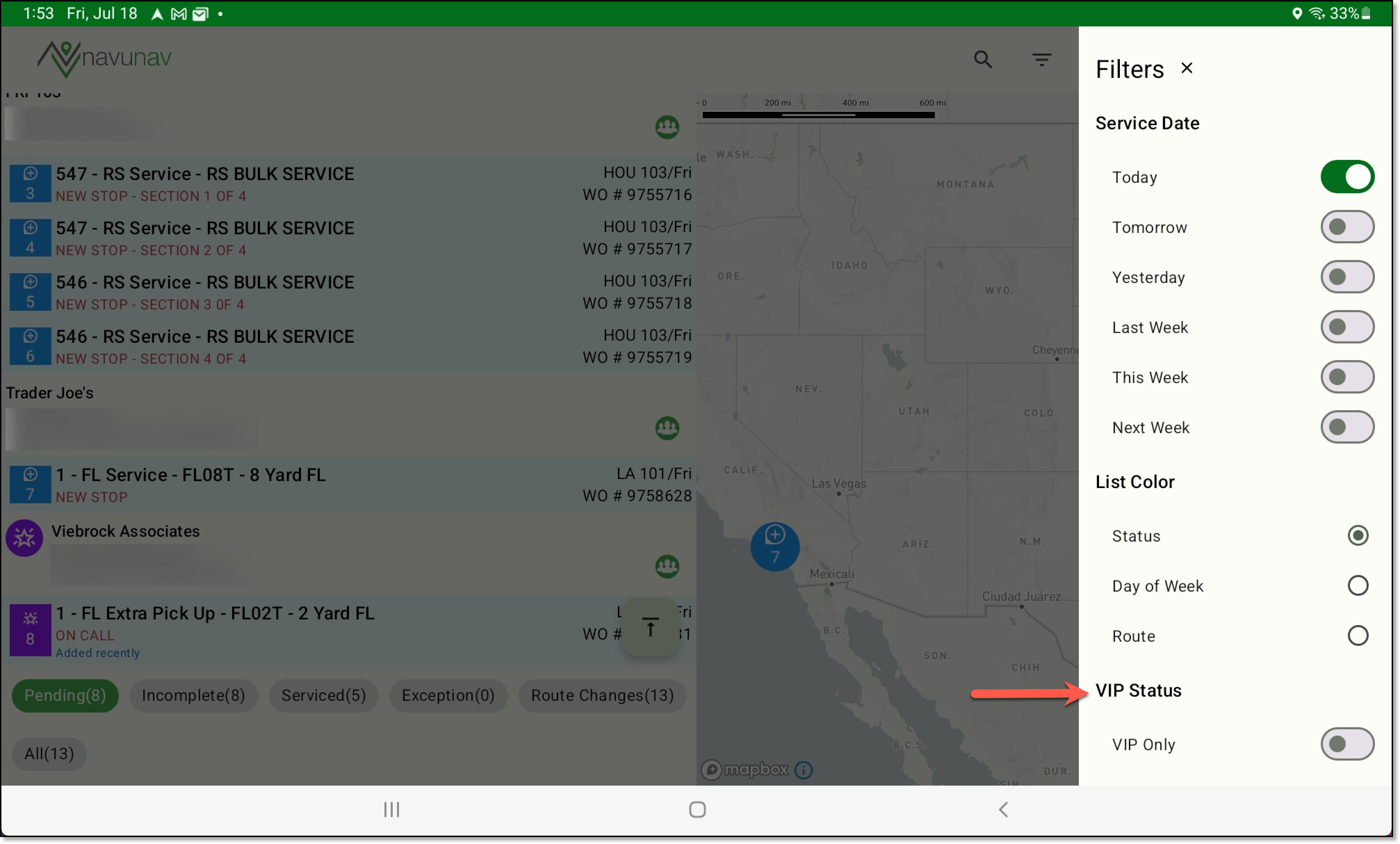
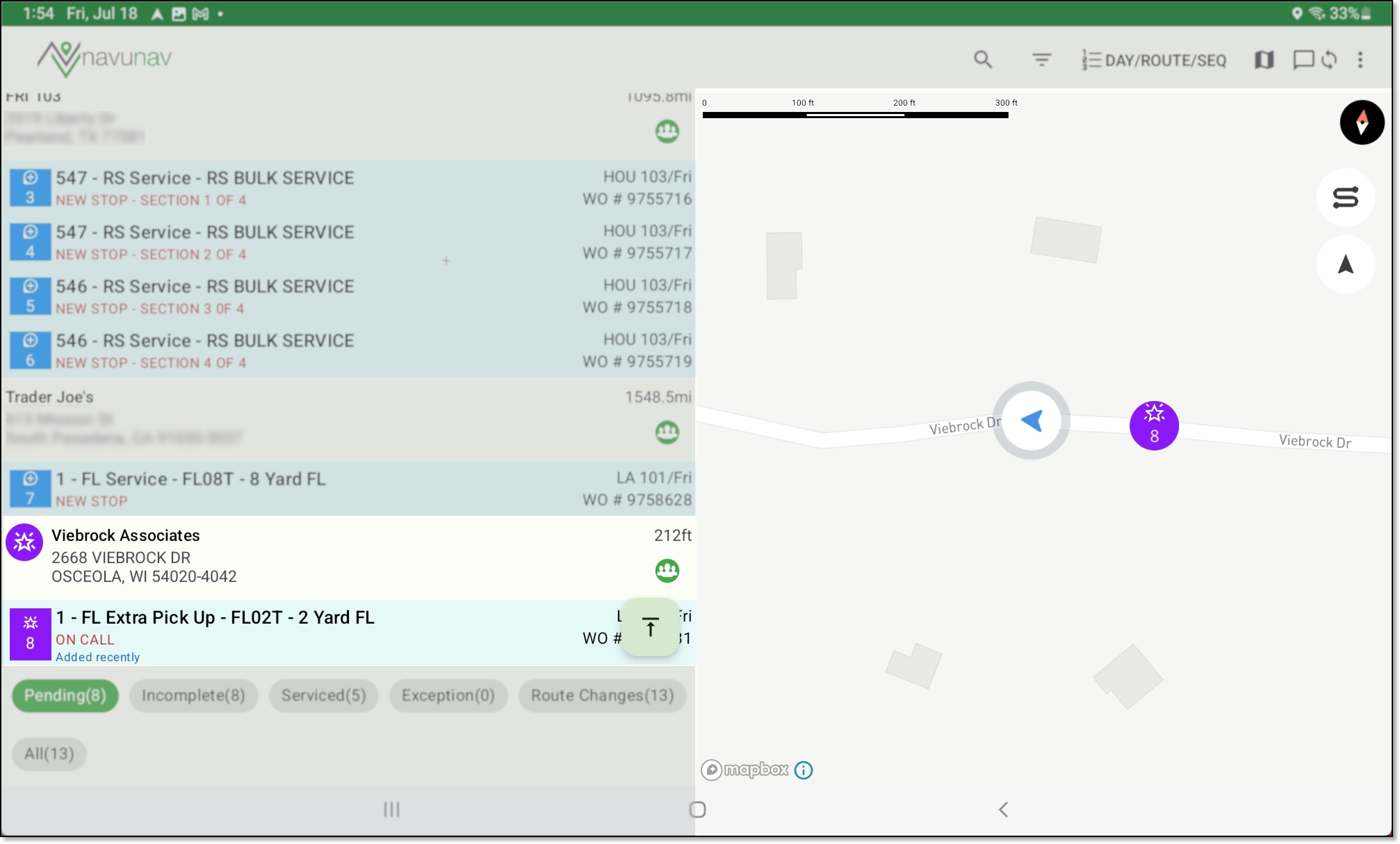
Pathway: NavuNav A new 'VIP' priority indicator has been added to the Add and Edit Site screens, to designate service locations with VIP status. When selected, this indicator will appear on the Customer Service screen, the Services List in Dispatch, and on the driver app. Expand the images below to see where dispatchers and drivers will see the VIP status icon.
Drivers can filter their screen to show only VIP sites by enabling the "VIP Only" filter. This filter is disabled by default.
The Services List and map in NavuNav will prominently display a purple VIP icon for sites marked as VIP. This icon will also appear in the service detail popup accessible to drivers.
A Sync Status icon has been added to NavuNav, displaying the total number of items pending synchronization.
An issue has been resolved that prevented Post Trip and Log Out times from being reported in Dispatch.
An issue has been resolved in the NavuNav application that caused it to crash when a driver captured a photo, enlarged it, clicked back, and attempted to recapture the photo.
An issue has been resolved that prevented users from appearing on the Conversation screen in the NavuNav (Android) driver app, preventing drivers from sending and receiving messages. Additionally, when a new message comes in, a sound will play and a message will display on the bottom of the screen.
A new Sequence Order toggle has been added to the Filters screen, allowing drivers to choose how stops are sequenced. Selecting "Working Sequence" updates the next stop to be labeled as '1' each time a stop is completed. Alternatively, selecting "Dispatch Sequence" displays the same sequence numbers shown in Dispatch.
By default, Working Sequence is set.
An issue identified in beta version 6.3.17 caused completed stops to revert to pending when a driver applied a resolution while the application was offline. This has been resolved.
A sporadic issue has been resolved that was causing the previously viewed account's number to display in the tooltip of the next site the driver was viewing when a phone number doesn't exist for the site.
In the NavuNav (Android) app, an issue that was causing the app to close unexpectedly has been resolved. Additionally, the default volume for driving directions is now set to mute.
Pathway: NavuNav > Residential Mode Previously in NavuNav, the Customer Signature screen did not respect permissions 257 (Add Contact) and 258 (Edit Contact), allowing drivers to add or edit a contact even when these permissions were set to “Not Authorized.” This has been resolved.
The following enhancements have been made to the Downtime and Start/End Lunchtime screens: The Downtime screen logic has been updated to allow users to save a downtime without specifying an End Time. While a downtime is in progress, the option to add another downtime will be inactive.
The Lunch Time logic has been updated to allow users to navigate away from the Lunch Time screen after starting lunch. If lunch is in progress and the user navigates away, a “Lunch In Progress” message will now appear at the bottom of the List/Service Detail screen. Additionally, a Lunch End option has been added to the app menu to record when lunch has ended.
An issue has been resolved in NavuNav where editing a disposal record would create a duplicate.
An option to start an inbound ticket has been added to Scale Photos in NavuNav to improve efficiency during truck line backups. The process and screen formats are consistent with those in the Navusoft Inbound screen, ensuring a familiar user experience.
Once an inbound ticket is created, it will appear in the Inbound screen for the facility where it was recorded.
Pathway: NavuNav > Scale Photos [application] The following enhancements have been made to the Scale Photos list in the NavuNav application: Pathway: NavuNav > Scale Photos [application] The placement of the check mark icon used to complete entries on the Items Collected screen has been improved so it remains visible when the keyboard is open.
An issue has been resolved that caused odometer and engine hours entered during the check-in and check-out process in NavuNav to report incorrectly in Truck Productivity.
Pathway: Operations > Dispatch > Truck Productivity An issue has been corrected that caused photos captured in portrait view from the NavuNav application to display sideways, causing the timestamp and location data to also appear rotated in NavuNav and Dispatch. An issue has been resolved that caused the map to recenter over Europe after completing menu actions such as recording downtime or capturing a a signature on stops.
Previously, when a user selected an image uploaded from NavuNav, it was downloaded instead of opening as a preview in a new tab. This issue has been corrected in NavuNav, and images now open in a new tab as intended in Dispatch.
Pathway: Operations > DispatchNavuNav (IOS) - Stops Marked With Exception Not Syncing (18122)
NavuNav (Android) - Return to List Updated (18377)

NavuNav (Android) - Phone Screen Size Compatibility Updated (18721)

NavuNav (Android) - Turn By Turn Calculations Not Recalculating (18735)

NavuNav (Android) - Logic Updated to Service Record Status Change and the Scheduled Date (17006)

NavuNav (Android) - Dark Mode Crashing App (18560)

NavuNav (Android) - VIP Status Added (18302) [New Feature]
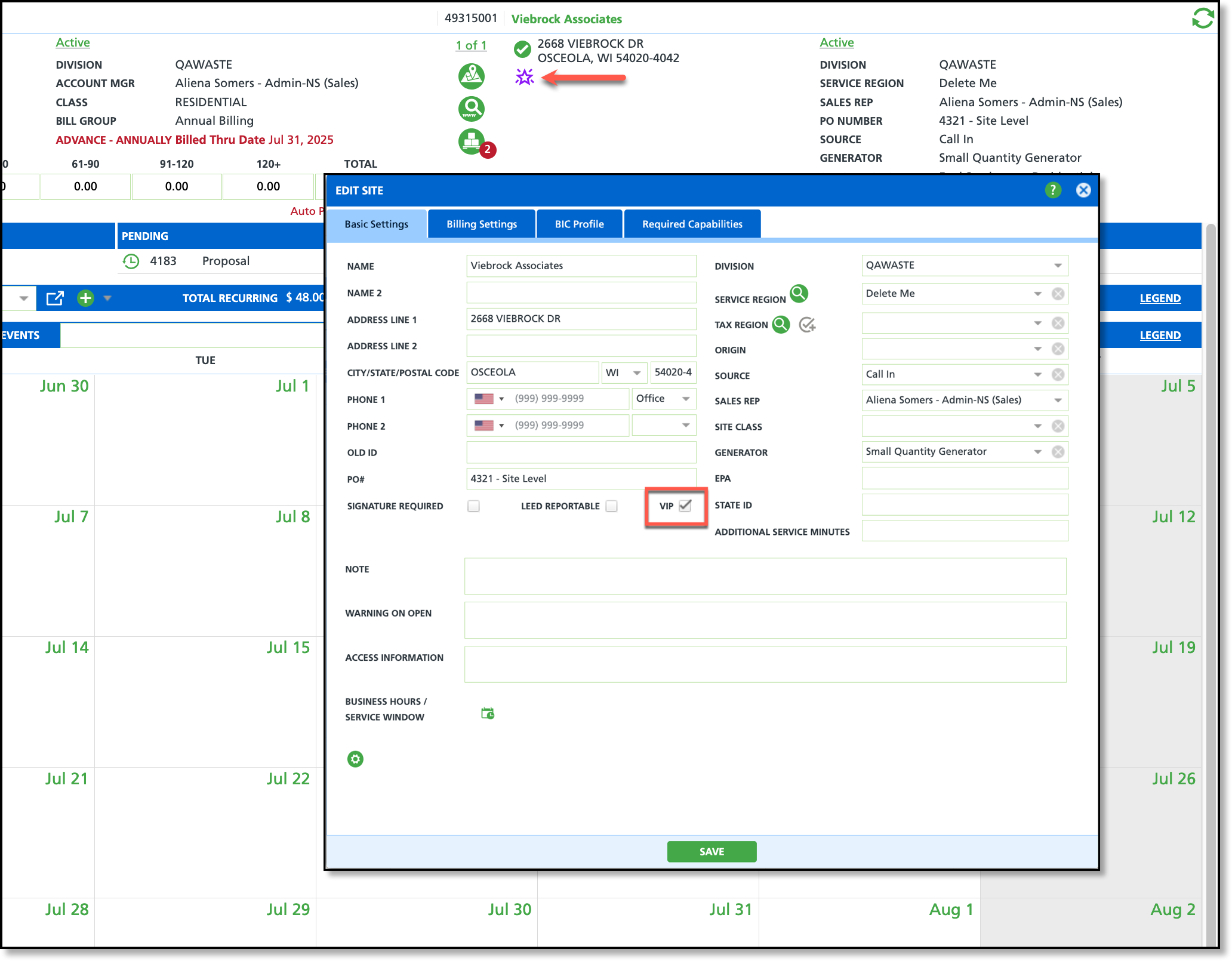
Services List (Dispatch)

NavuNav Filter Setting
NavuNav
NavuNav (Android) - Sync Status Icon with Count Added (18807) [New Feature]

NavuNav (Android) - Check Out Action Not Recording (18556)

NavuNav (Android) - Photo Enlarge/Exit Triggers App Crash (18889)

NavuNav (Android) - Conversations Screen Not Displaying Users (18332,18873)

NavuNav (Android) - New Sequence Order Added to Sort/Filter Screen (18316) [New Feature]

NavuNav (Android) - Stops Switching Back from Completed to Pending (18327)

NavuNav (Android) - Wrong Phone Number Appearing on Map Tooltip (18853)

NavuNav (Android) - Residential Mode Crash Issue Resolved (18919)

NavuNav (Android) - Updated Permission Logic for Signature Capture (19025)

NavuNav(Android) - Modification to Downtime and Start/End Lunch Screens (17381)
Downtime

Lunch time

NavuNav(Android) - Editing Disposal Ticket Created Duplicate Disposal Record (19091)

NavuNav (Android) - Scale Photos - Ability to Create an Inbound Ticket (18201) [New Feature]

To support this, the following screens have also been added:
Create New Transaction - Search Options & Search Results
Search Type options include:
- Route
- Site
- Truck
- Work Order
- Waste Profile
Create Inbound Order
- Includes option to add a truck

Sync to Inbound screen in Navusoft

NavuNav (Android) - Scale Photos - Screen Enhancements (18202)

NavuNav (Android) - Improvement to Items Collected Screen (19200)

NavuNav (Android) - Odometer and Engine Hours Not Updating Correctly in Navusoft (19203)

NavuNav (Android) - Update to Photos Captured in Portrait View (19097)
Image Example in NavuNav

Image Example in Dispatch

NavuNav (Android) - Map Centering Update on Stop List Screen (19276)

NavuNav (Android) - Logic Updated to Image Upload (19239)

Customer Portal
An inconsistency in password length validation between the Enter New Password and Confirm New Password fields has been corrected. Both fields now enforce a maximum length of 100 characters.
Pathway: Customer Portal The display size of disposal ticket images in the Customer Portal has been increased for easier viewing when hovering over the image icon. Additionally, clicking the View link now opens the image in a separate window for enhanced visibility.
Pathway: Customer Portal New setup fields and logic have been added to System Options and Account Class Setup to support automatically sending portal invitations to new contacts and allowing customers to self-register using a recent invoice. A new "Enable Request Login Button" option has been added to the Customer Portal section in System Options Setup. This setting controls whether the "Request Login" link is displayed on the Customer Portal sign-in page.
A new field, "Allow Invoice-Verified Self Registration," has been added to Account Class Setup. When enabled, it allows customers to request a portal login invitation using a recent invoice that includes an invoice number and either a quick pay code or an account number. A new field, "Auto Send Portal Invitation on Contact Creation," has been added to Account Class Setup. When enabled, it automatically sends a portal invitation to contacts upon creation, provided a valid email address is entered.
The following logic has been implemented to support automatically sending a portal invitation to contacts on both new and existing accounts:
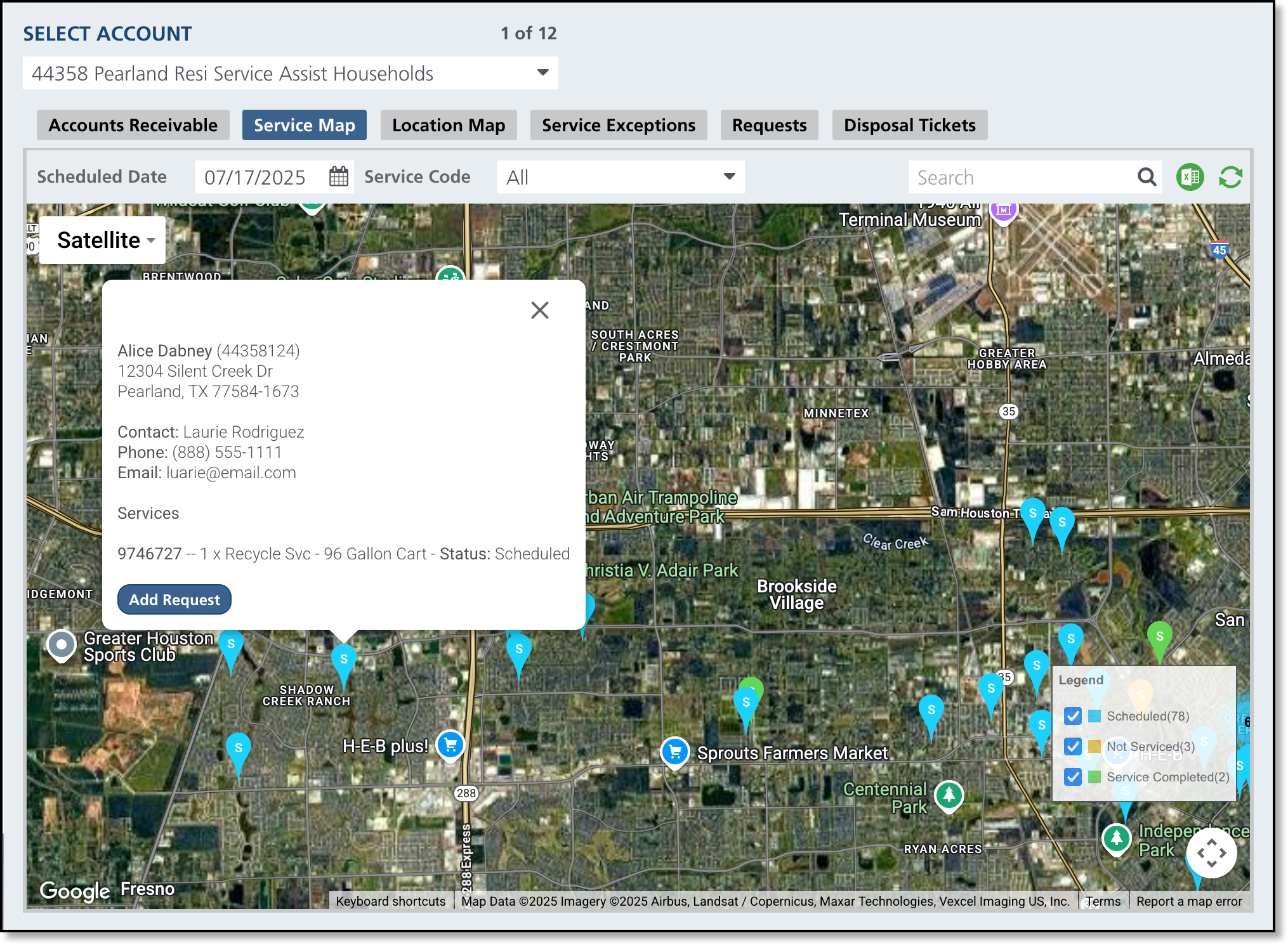
When a new active account is created, and the account class has 'Auto Send Portal Invitation on Contact Creation' set to 'Yes' and an email address is entered for the contact, a Customer Portal invitation will be sent automatically. When creating a new contact for an active account, an email will be automatically sent if the account class has 'Auto Send Portal Invitation on Contact Creation' set to 'Yes' and an email address is entered for the contact. Mapping features available to Municipal account classes in the Customer Portal have been updated with the following: A new Service Map has been added with the following features: Not shown- If the Scheduled Date is today, the current location of the truck servicing the route will also be displayed.
Pathway: Customer Portal An issue has been resolved where, if a site had no active services, the Activity Calendar displayed results from the previously viewed site.
Pathway: Customer Portal > Activity CalendarCustomer Portal - Reset Password Updated

Customer Portal - Disposal Ticket Image Enlarged (18354)

Customer Portal - Ability to Self-Register and Auto Send Portal Invites (18439, 18449) [New Feature]
Self Register Setup
System Settings: System Options [Customer Portal]

System Settings: Account Class [Customer Portal]

Auto Send Portal Invites
System Settings: Account Class [Customer Portal]

Logic Updates to Add Account and Add Contact
Add Contact to New (Active) Account
Add Contact to Existing (Active) Account
Customer Portal (Municipal) - New Location Map and Updates to Service Map (18438) [New Feature]
Location Map (Previously 'Service Map') includes the following updates:
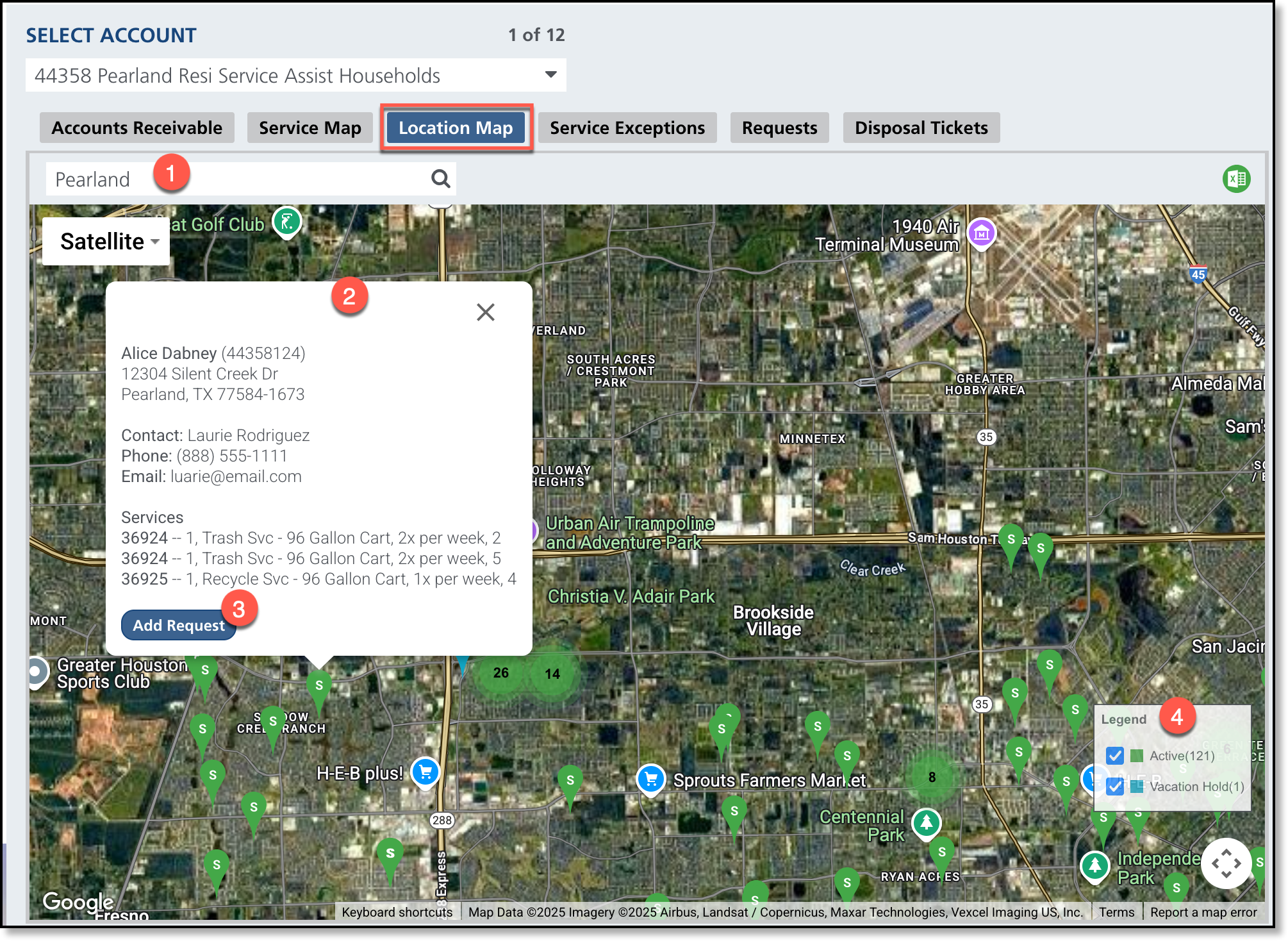
New Service Map
Customer Portal - Incorrect Display of Services on Activity Calendar (18272)
